
How to Set Up a Proxy for Facebook
Facebook is the largest source of solvent traffic in the world. Yet, running a Facebook proxy the wrong way can shut that down fast. Meta's security systems analyze hundreds of parameters to control access: browser fingerprints (Canvas, WebGL), IP address history, and behavioral patterns.
Launch an Ads Manager or manage multiple Facebook client profiles from a cheap datacenter IP, and it can trigger automated security systems, leading to activity suspension, repeated verifications, or disabled ad accounts.
In this guide, we'll break down how to choose the best proxy for Facebook. You’ll learn the real difference between residential vs mobile proxy for Facebook, and how to set up a stable workspace for Facebook multi-accounting and SMM management.
Why you need proxies for Facebook
No serious ad launch or SMM project runs well on weak IPs. Proxies solve several core problems for agencies and marketers working at scale.
1. Client profile & multi-account management
Agencies often manage dozens of client accounts, and each profile needs its own dedicated IP. Running multiple accounts through the same IP creates a common network signal, so activity on one account can affect the others. Dedicated mobile IPs keep each account on its own network route for safer Facebook multi-accounting.
2. Ads Manager and Business Manager workflows
Running campaigns through Ads Manager or managing a Facebook Business Manager requires a stable connection. Frequent IP or location changes can trigger additional verification and disrupt access. Assigning each client workspace a dedicated IP keeps its network environment consistent.
3. Facebook scraping and competitor research
Marketers scrape the Facebook Ads Library and public pages to study competitor creatives, copy, and campaign patterns. Rotating residential IPs let this happen at scale without hitting rate limits or getting the scraping IP blocked.
4. Access to geo-targeted content
Proxies let marketers work with Facebook from specific countries and regions without being physically located there. For GEO testing, agencies can route traffic through the target market to check localized campaigns, landing pages, and ad experiences as they appear to users in that region.
5. Teamwork
If you hand a client account to a targetologist or SMM manager in another city, a sudden IP change can break the session. Transferring the account together with its proxy keeps the connection consistent through the handoff.
New Facebook account setup usually requires phone verification. CyberYozh's SMS verification service provides virtual numbers from mobile carriers, so each account gets a clean, separate number from day one. Get a virtual number →
Types of Facebook bans and restrictions
Facebook doesn't use outright bans. It applies different restrictions depending on the account, asset, and activity involved:
Checkpoint / ID verification – access is temporarily limited and Facebook asks for ID, phone, or other verification. An unfamiliar IP or device can contribute to the trigger.
Reduced reach – the account stays active, but content gets significantly less visibility. “Shadowban” is a common user term, not an official Meta restriction.
Ads Manager disable – an ad account is restricted or disabled, stopping its active campaigns. Policy violations, payment issues, or suspicious activity can trigger it.
Business Manager restriction – access to business assets can be limited, potentially affecting linked ad accounts, Pages, and team permissions.
These restrictions have different causes, but inconsistent IPs and frequent changes in location or network environment can add risk to an otherwise legitimate workflow.
How to choose the best proxy for Facebook workflows
The choice depends on the specific tasks of your agency. At CyberYozh App, we provide tools for any purpose.
Proxy Type | Trust Level | FB Proxy Purpose | Verdict |
|---|---|---|---|
Mobile 4G/LTE (private) | 💎 Maximum | Account scaling, Ads Manager, Business Manager, binding corporate cards | SMM industry standard. Due to CGNAT technology, thousands of real users share one mobile IP. Reliable for Facebook, Instagram, and WhatsApp Business. |
Residential (Static) | 🟢 High | Corporate and client account management | Excellent for long-term work. One permanent home IP that doesn't change. Facebook sees a stable connection. |
Residential (Rotating) | 🟡 Medium | Analytics collection, session preparation, Ads Library scraping | For scraping/automation. Not for account management – IP rotation may trigger platform suspicion. |
Datacenter (IPv4/IPv6) | 🔴 Low | Public data parsing | Not for accounts! High risk of restrictions when accessing Ads Manager or Business Manager. |
Quick decision guide
Mobile LTE/5G → best proxy for Facebook Ads Manager, Business Manager management, and scaling client accounts where mobile carrier IPs are preferred
Static residential / ISP → long-term client accounts and stable session workflows where mobile isn't required
Rotating residential → GEO testing, competitor research, and public-data collection
Datacenter → technical tasks, automation, and high-volume operations where residential IPs aren't necessary.
Why private mobile proxies are the optimal choice
Shared mobile proxies put multiple users on the same IP at once, so someone else's flagged activity can affect your account too. A private proxy gives you exclusive use of that IP: no other user, no unrelated risk. You can safely manage dozens of client profiles from one dedicated connection.
Why VPNs fail for multiple Facebook accounts
A VPN gives your device a single outbound IP. Every account you're logged into shares that same IP, whether it's one account or ten – the VPN has no concept of separating them.
This becomes a problem once you're running multiple profiles:
Facebook sees multiple accounts from the same IP, creating a shared network signal across separate accounts.
Switching VPN servers doesn't fix it – it just changes the IP for every account at once.
Proxies work differently. Each account runs through its own dedicated IP, keeping network routes separate. That's why proxies are better suited to multi-account Facebook management at agency scale.
How to set up a proxy for Facebook (using Dolphin Anty antidetect browser)
Running a regular browser for professional SMM management usually isn't enough. Platforms read many parameters, and this can cause session overlap between different clients. Antidetect browsers like Dolphin Anty, AdsPower, Octo Browser, or GoLogin solve this by isolating each profile completely.
Here's how to set a mobile proxy in Dolphin Anty:
Step 1. Click "Create Profile" to start a new isolated browser profile for each client account — one profile per account.
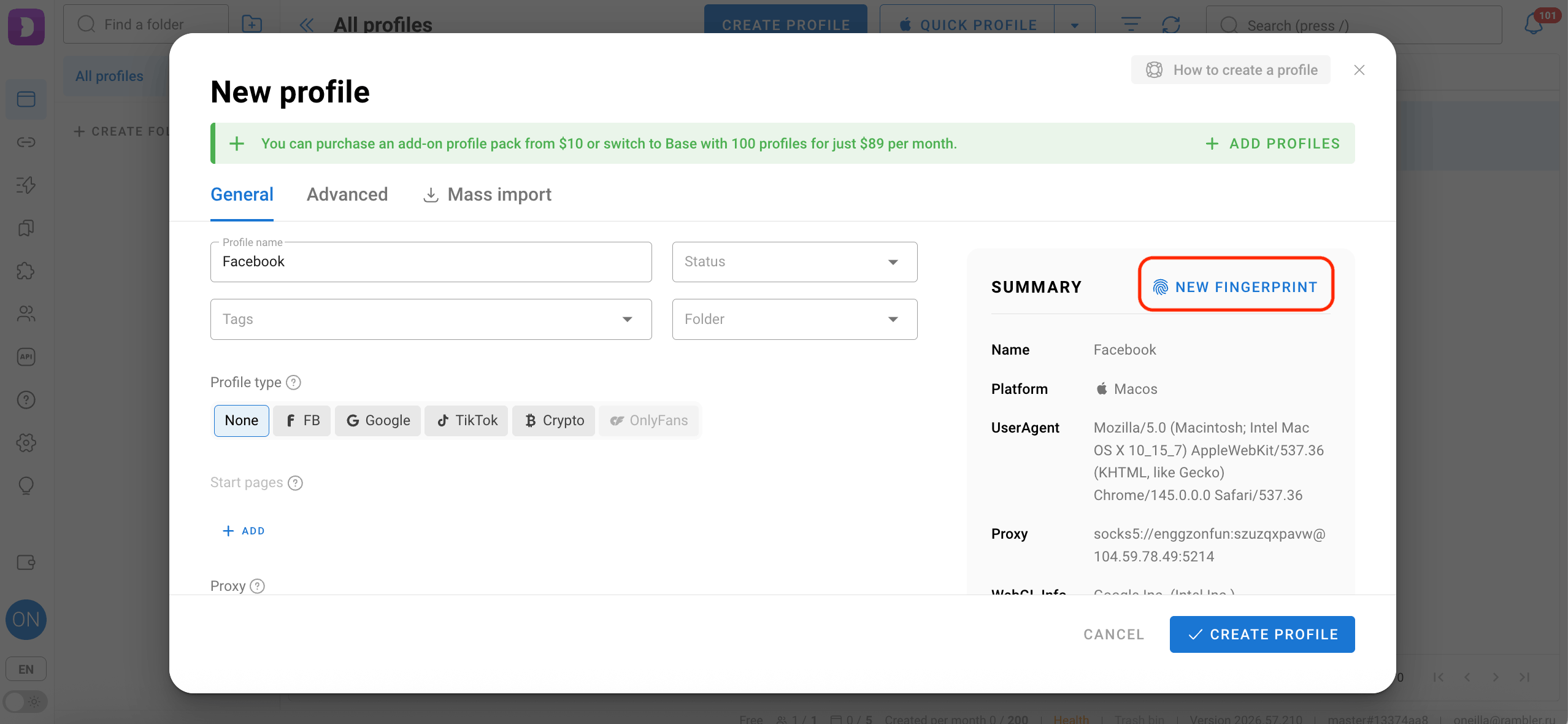
Let the browser generate a unique fingerprint and cookie storage. Dolphin Anty auto-generates Canvas, WebGL, font, and other device parameters per profile, with fully isolated cookies — so no two profiles look like the same device or share session data.
Step 2. Paste your proxy credentials taken from your CyberYozh personal account.
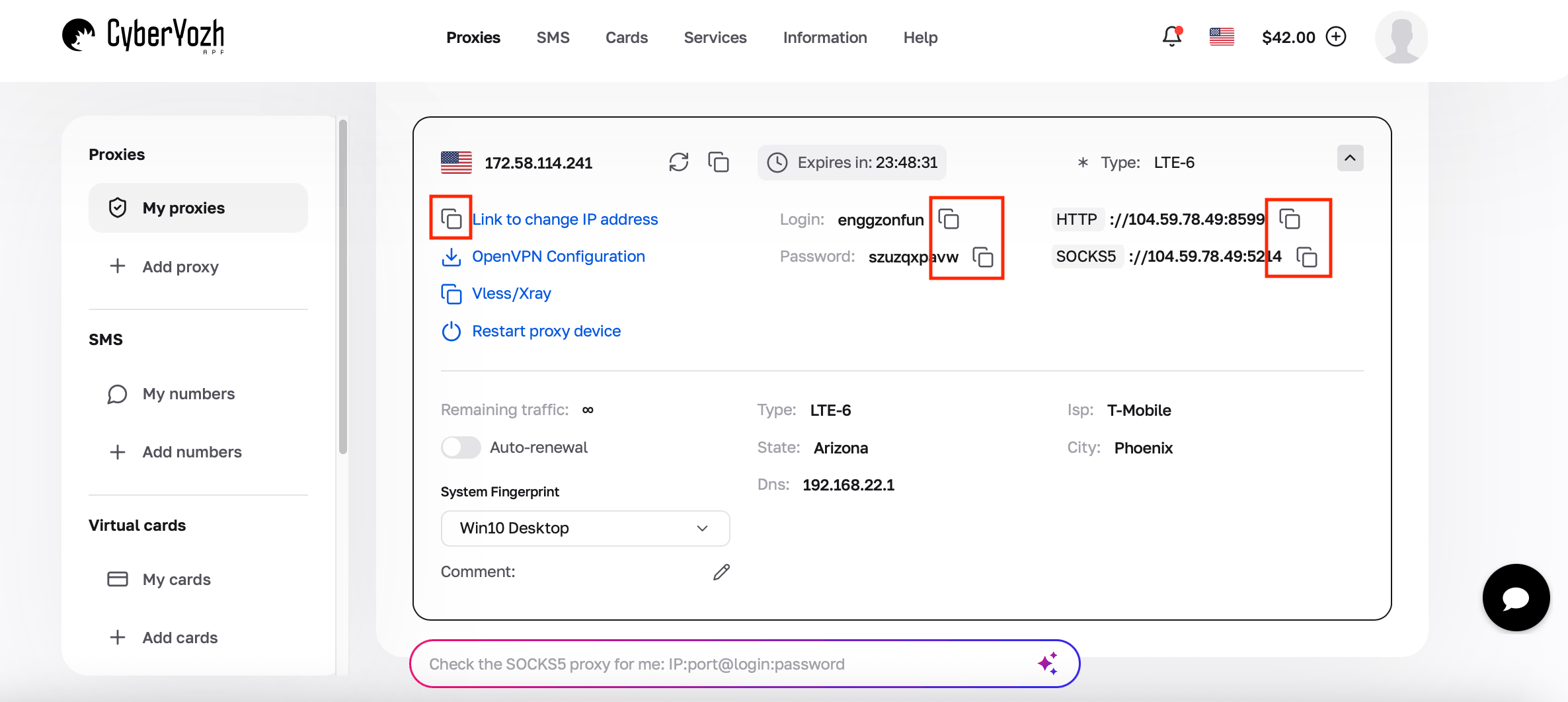
Use the format host:port:login:password.
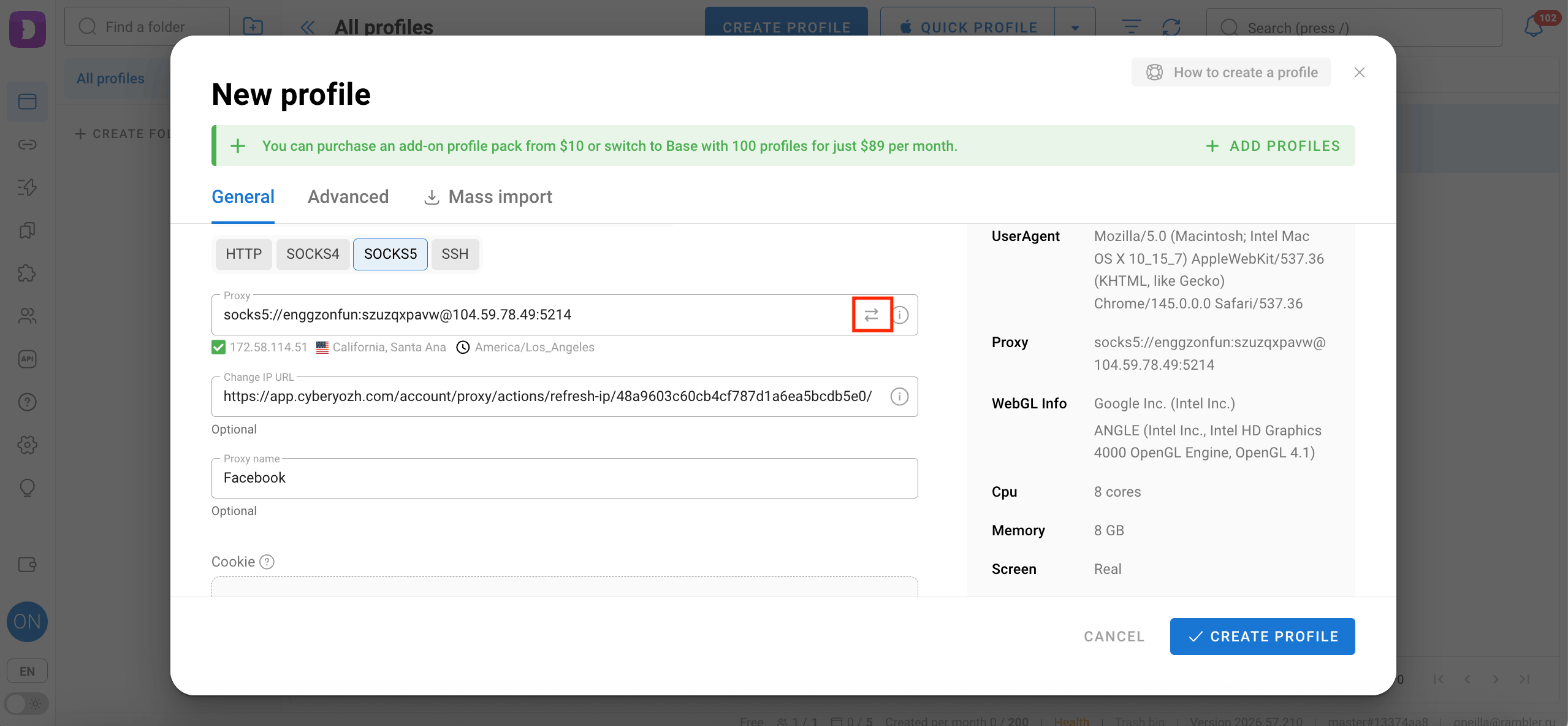
Run the connection check (the arrows icon next to the proxy field). Dolphin Anty will confirm the credentials work and auto-detect the IP's geolocation and timezone.
Step 3. Confirm GEO, timezone, and language match the proxy location. Dolphin Anty auto-fills these, but they're worth verifying manually. Click "Create Profile," then "Start."
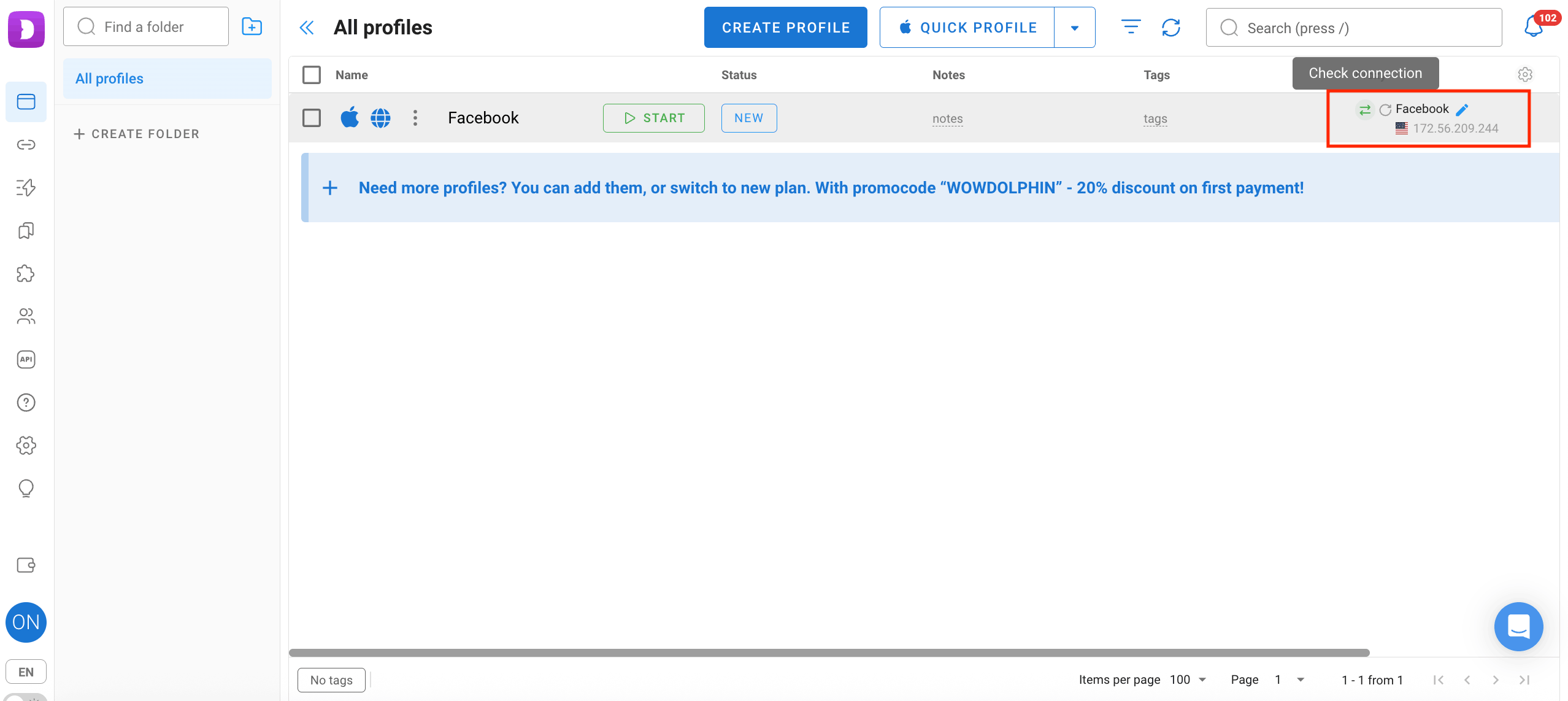
Open the profile and visit an IP-check site (like whoer.net) to confirm the proxy is active before logging into Facebook.
Not using Dolphin Anty? Learn how to set up proxies in any anti-detect browser.
For proxy selection and setup across other social platforms, read our proxy for social media guide.
How to assign proxies to Facebook accounts
The rule is simple: one profile, one proxy. It becomes a repeatable operational model. For an agency running 10 Facebook accounts, that means 10 browser profiles and 10 dedicated proxy IPs.
What matters is that this chain stays consistent for the life of the account: account → browser profile → proxy → GEO → session. If any link in that chain changes unexpectedly (a proxy swapped between profiles, a GEO mismatch, a session restarted on a different IP) can create the inconsistency platforms can flag.
In practice, the daily workflow using proxy for Facebook looks like this:
Log into client profile #1
Complete the day's tasks
Close the profile
Open client profile #2 with a new, clean mobile IP.
This keeps every account's proxy history isolated, even when the same agency is running dozens of profiles.
Conclusion
Facebook applies strict, layered checks on connection quality, and cutting corners with datacenter proxies usually ends the same way: temporary or permanent loss of access to Facebook accounts and Business Managers.
The right proxy for Facebook depends on the task in front of you.
Use case | Proxy | Why |
Scaling and launching campaigns | Preferred proxy for multiple Facebook accounts: carrier IPs, unlimited bandwidth, stable sessions | |
Managing long-term client accounts | Persistent IPs for consistent account access | |
Scraping and competitor research | Rotating residential IPs for distributed data collection and research |
Match the proxy to the task, keep the account → profile → proxy → GEO chain consistent, and Facebook sees exactly what it should: a stable, trustworthy connection.
A flagged or blacklisted proxy IP can trigger a checkpoint before you've even logged in, wasting a profile before it starts. CyberYozh's IP Fraud Score checker verifies IP reputation upfront before you run traffic. Check IP reputation →