
Proxy for Social Media
Social media platforms don’t treat accounts as fully independent. They connect activity through IP reputation, session consistency, and behavioral patterns across logins and devices.
When multiple accounts operate under the same network conditions, platforms start linking them or applying restrictions. This is a common challenge for teams running multi-account setups, automation workflows, or large-scale content operations.
Proxies for social media help agencies, marketers, and automation teams separate account environments and maintain stable sessions on platforms like Instagram, TikTok, Facebook, LinkedIn and X.
In this guide, we’ll break down:
How a proxy for social media enables account separation and session stability
Which proxy type to use for each platform (Instagram, TikTok, Facebook, X, LinkedIn) and real use cases
The difference between mobile proxies, residential, and datacenter proxies and when to use each
Proper proxy setup with antidetect browsers, including account mapping and session isolation.
Quick reference: Matching social use cases to proxy types
Use case | Proxy type | Rotation |
|---|---|---|
Managing 50+ Instagram accounts | Mobile private | Same IP 6+ hours |
TikTok content posting/automation | Mobile private | No rotation |
Facebook Business Manager/ad accounts | Static residential | Sticky session |
LinkedIn B2B lead generation | Static residential | Minimal rotation |
X (Twitter) account farming | Mobile or residential | Sticky 6+ hours |
How social networks detect linked accounts
To evaluate accounts, social platforms build a combined profile of behavior, network conditions, and device identity to determine whether accounts are related. When these signals show overlap, platforms may reduce trust, trigger verification, or limit account activity.
Social media platforms typically evaluate:
Same IP usage across multiple accounts
Rapid geo changes between logins or sessions
Aggressive or unnatural automation patterns
Session consistency over time (cookies, login persistence)
ASN and network reputation of the IP range.
Which proxy type should you use for social media?
Different proxy types behave differently depending on how social platforms evaluate trust, session stability, and network reputation. Choosing the wrong type can lead to unstable sessions, while the right setup improves consistency across multi-account and automation workflows.
Proxy type | Best for | Advantages | Limitations |
Multi-account management, account warm-up, ad accounts, TikTok, Instagram, X | Real carrier IPs, highest trust level, session stability, works well for stricter platforms | Higher cost compared to other types | |
Long-term branded accounts, profile-based management, consistent posting | Stable IP, predictable sessions, good for account history building | Not designed for rotation or scraping | |
Social media scraping, geo testing, ad verification, market monitoring | Large IP pools, flexible geo targeting, scalable for data collection | IP rotation can disrupt session consistency | |
Testing, low-risk automation and development | Fast response times, low cost, easy scaling | Lower trust on social platforms, detection risk |
Learn more about each proxy type:
👉Residential vs. datacenter proxy comparison.
How to set up a proxy for your social media workflow
Managing multiple social media accounts without getting banned requires hiding your real IP address and digital fingerprint. By routing each account through a separate proxy inside an anti-detect browser, you can operate dozens of profiles safely from a single device.
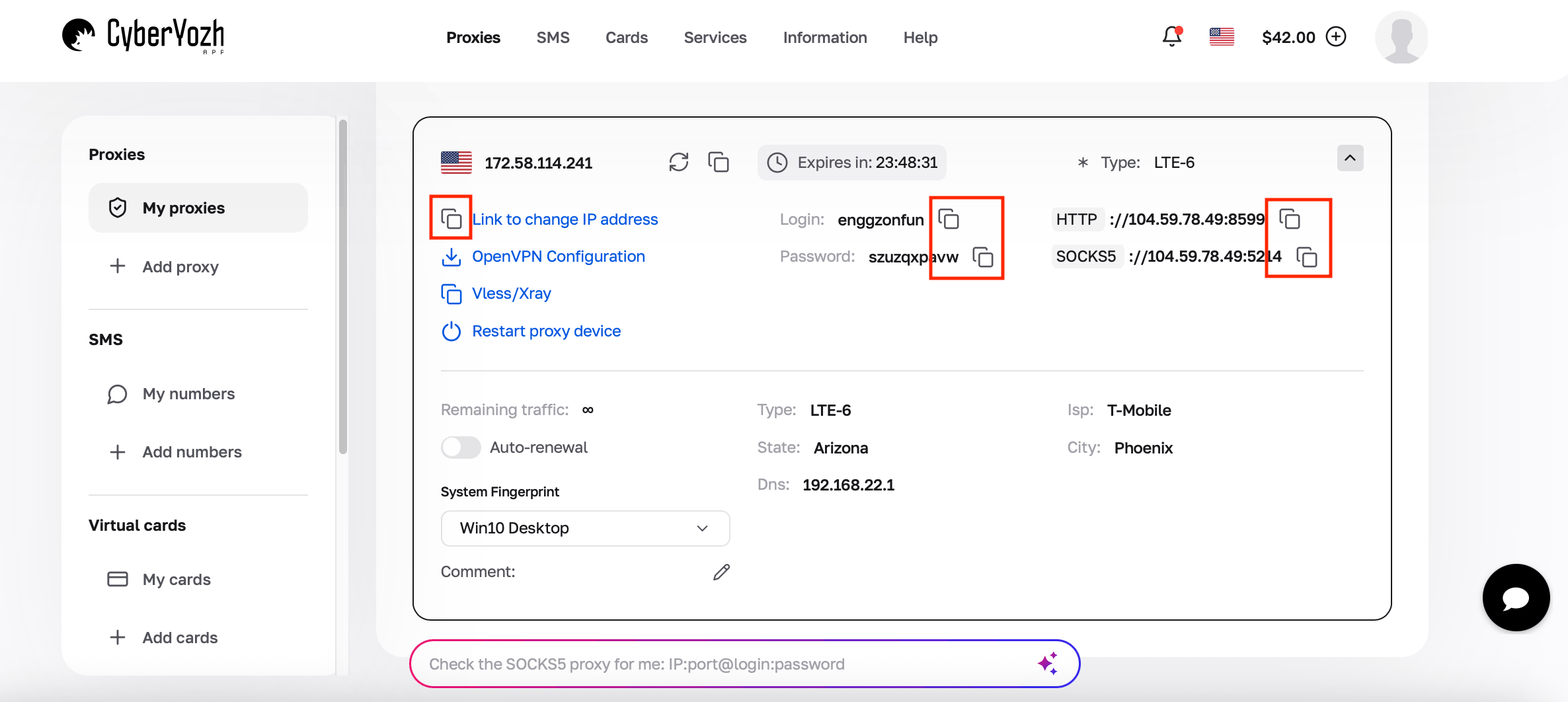
Step 1. Purchase a proxy and obtain credentials
Purchase a mobile or residential proxy from CyberYozh and copy the proxy credentials provided in the dashboard: IP address (Host), Port, Login, and Password. Sign up to get proxies.
Step 2. Create a new profile in your anti-detect browser
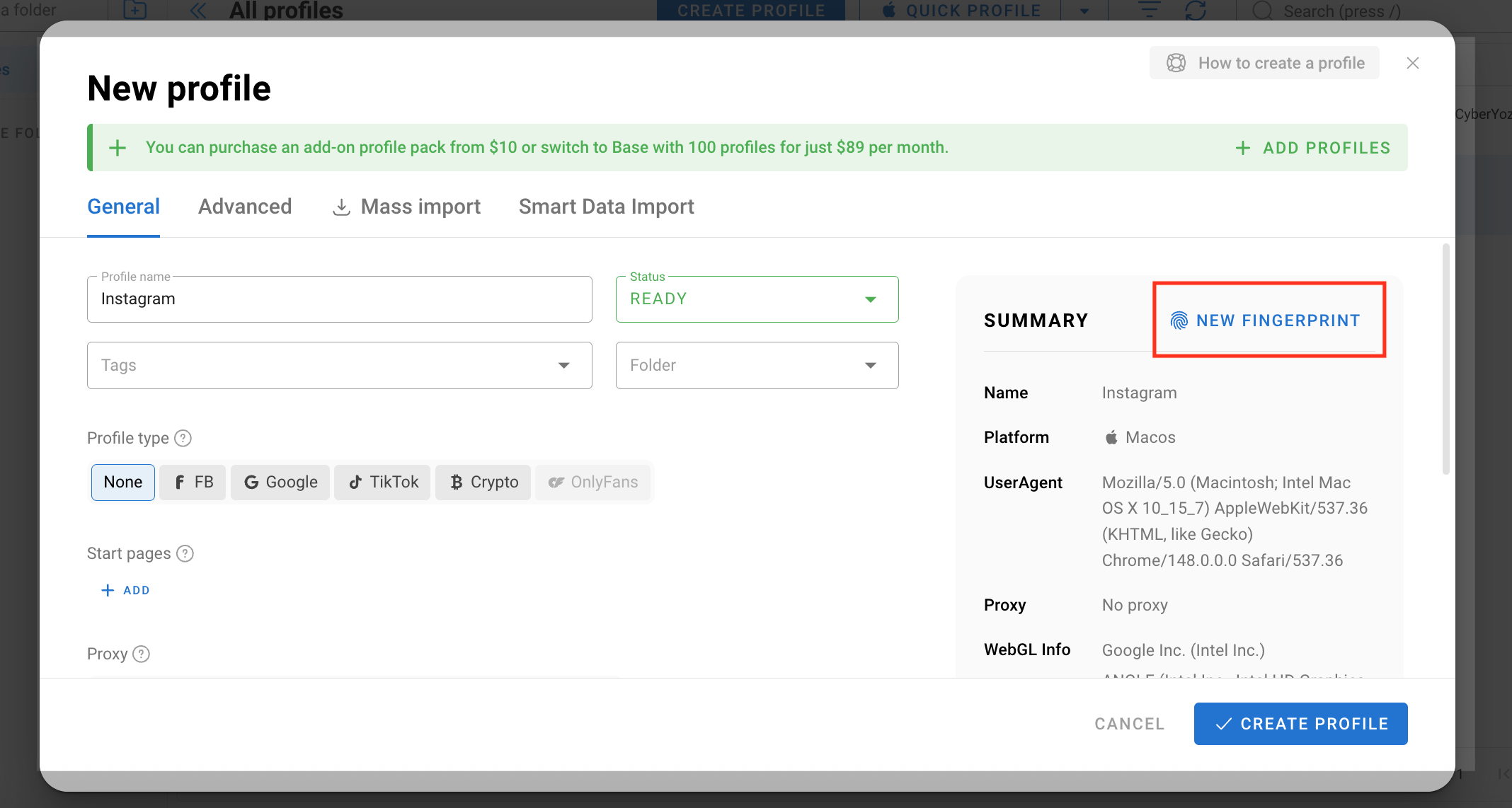
Anti-detect browsers spoof or replace your device’s digital fingerprint (canvas, WebGL, timezone, etc.), allowing you to run multiple accounts without linking them. You can integrace CyberYozh proxies with any anti-detect browser of your choice (such as GoLogin, AdsPower, or Mulogin). In this example, we will integrate CyberYozh proxies with Dolphin Anty.
Open Dolphin Anty, click Create Profile, and enter a profile name for the Instagram account. Click New fingerprint to generate a fingerprint and scroll down to the Proxy section.
Step 3. Add the proxy to the browser profile
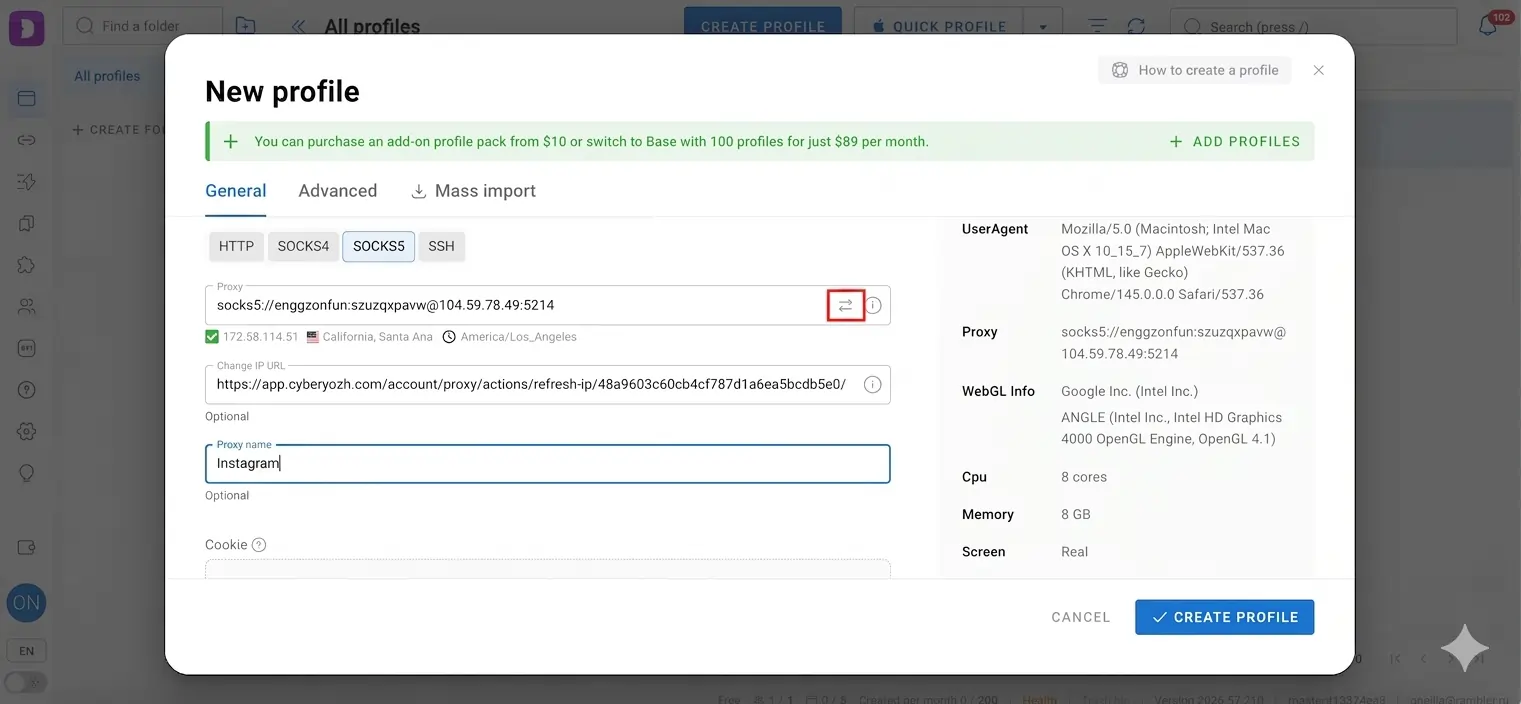
Select the proxy protocol provided by CyberYozh (HTTP or SOCKS5), then paste the proxy credentials in the following format: protocol://login:password@host:port.
Click Check Proxy (⮂) to verify that the proxy works.
Step 4. Launch the browser profile
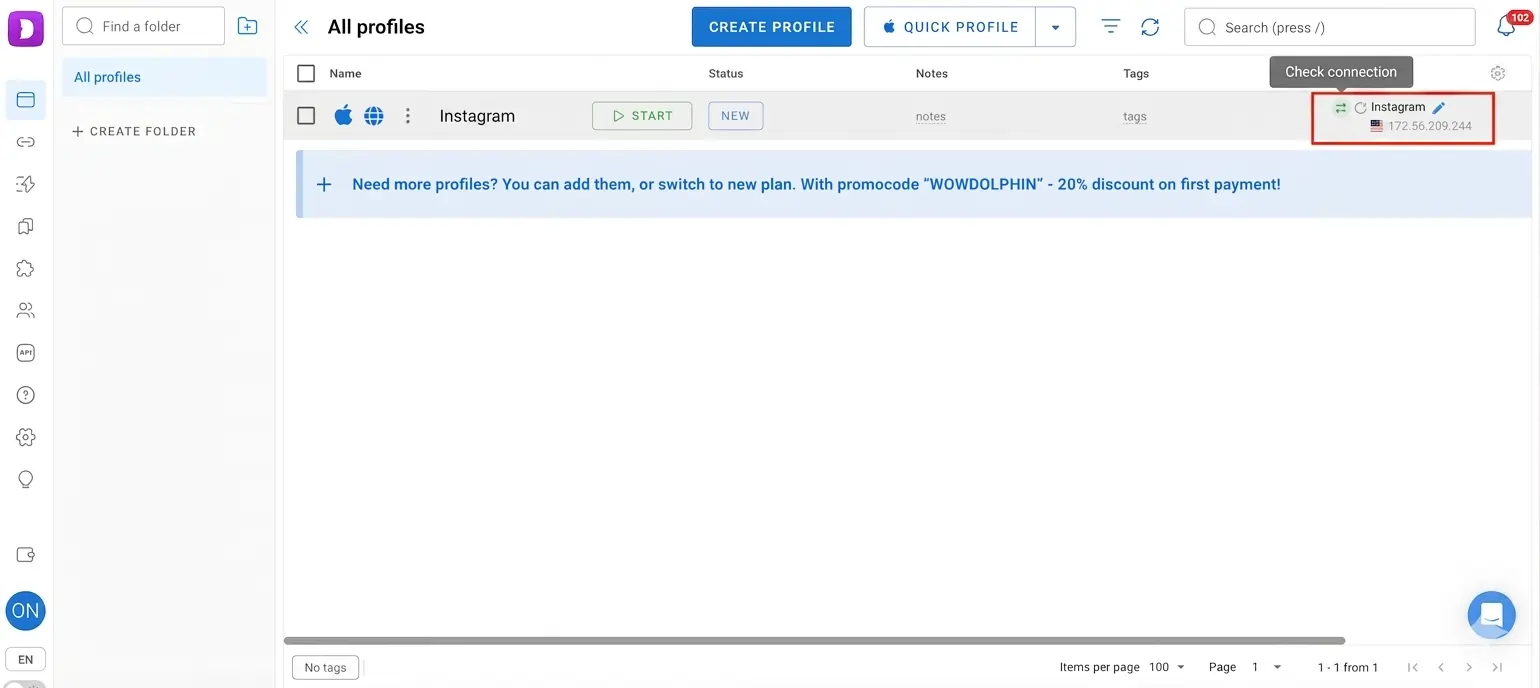
Click Create Profile, then press Start to open the isolated browser environment with the assigned proxy connection.
Step 5. Log into Instagram
Open Instagram inside the launched Dolphin Anty profile and sign into the account. For future sessions, continue using the same browser profile with the same proxy attached to maintain consistent session behavior and account identity.
What are the best proxy types for different social networks
Different platforms apply different levels of trust scoring, session sensitivity, and automation detection. Choosing the right proxy type per network helps maintain stable account behavior and reduce unnecessary verification.
Sticky mobile proxies work best for multi-account setups, with one account cluster per IP, consistent city/carrier targeting, and gradual warm-up to build trust over time.
TikTok
Mobile proxies are preferred for TikTok due to stricter session validation, with stable IP assignment, minimal geo switching, and strong emphasis on session consistency.
👉 Read the TikTok proxy article for a setup guide and instruction for multi-accounting in TikTok.
Facebook / Meta
Residential proxies and static sessions are more effective for ad accounts and page management, combined with browser isolation for stable account identity.
👉 Read the Facebook proxy guide to configure residential or mobile proxies for stable access to Facebook Business Manager and Ads Manager workflows.
Residential proxies with minimal rotation support slow, human-like automation and stable professional account behavior.
👉 Read the detailed LinkedIn proxy guide for B2B environments to use residential static proxies for lead generation workflows and CRM-related integrations.
X (Twitter)
Proxy choice depends on the use case. API-based data collection differs from account-based management, where stable residential or mobile sessions are preferred.
👉 Read the Twitter proxy guide to maintaining a high IP reputation, safely managing NFT projects, and setting up proxies for stable account management and content distribution.
Vkontakte (VK)
Residential or mobile proxies are used for VK account management and community automation, with stable IP assignment to maintain consistent session behavior.
👉 Read the VK proxy guide for managing multiple accounts, community posting workflows, and stable regional identity in VK environments.
Proxy + antidetect browser setup
Antidetect browsers are used to manage multiple social media accounts by isolating cookies, sessions, and browser fingerprints. Each profile operates as a separate environment, with a dedicated proxy assigned to ensure consistent network identity per account.
Common tools used in this workflow include AdsPower, Dolphin Anty, and Multilogin. These environments allow structured account isolation.
Read the integration guides for setup instructions with CyberYozh proxies:
Setup rule: Assign one proxy to one browser profile. Never reuse the same proxy across multiple profiles. Proxy format example for most antidetect browsers: protocol://login:password@host:port. Set sticky session duration to 6+ hours for account stability.
Social media proxy integration with automation tools
Social media proxies are commonly integrated into automation frameworks and account management environments to distribute requests, simulate user behavior, and manage multiple workflows at scale without overlapping sessions.
Common tool categories include:
Browser automation frameworks
Use Puppeteer, Playwright, Selenium, and Browser Automation Studio (BAS) for automated browser actions and workflow scripting.
Proxy suggestion: sticky mobile proxies for account actions, rotating residential for data collection.
Workflow automation tools
Use PhantomBuster for repetitive social media actions, data collection, and lightweight automation tasks
Proxy suggestion: static residential; session must remain consistent per task.
Mobile proxy tools
Use Super Proxy, Potatso, Shadowrocket, ProxyDroid - manage accounts and keep mobile-based account sessions stable.
Proxy suggestion: mobile private proxies.
Common mistakes when using proxies for social media
Many issues in social media operations come from inconsistent setup rather than the proxy itself. The goal is not just to use a proxy, but to maintain stable account environments.
Mistake | Solution |
|---|---|
Datacenter proxies for account-based workflows | Use mobile or residential proxies for accounts and any activity where account trust matters. Reserve datacenter proxies for testing, scraping, or non-account automation. |
Rotating IPs too frequently | Keep sticky sessions for logged-in accounts. Change IPs only when rotating full account environments. |
Running multiple accounts in one browser profile | Assign one browser profile per account and connect each profile to a dedicated proxy. |
Switching countries or regions constantly | Keep consistent geo-location per account. If geo changes are required, warm up the account gradually. |
Running automation with unstable sessions | Run automation only in stable sessions. If behavior or IP changes frequently, reduce automation intensity. |
Conclusion
Successful social media requires a structured infrastructure where sessions stay consistent, browser environments are isolated, and automation behavior remains realistic over time. Without this alignment, accounts become unstable regardless of proxy quality.
Mobile and residential proxy for social media support this setup by providing stable network identity across platforms, helping maintain operational consistency for agencies, media buyers, and automation teams working at scale.