
How to configure proxy in AdsPower
The AdsPower browser guarantees a high Trust Rate from target platforms. A proper AdsPower proxy setup keeps your profiles safe from critical errors right from the start.
The interface screenshots show the English version. You can always switch the language in the program settings.
Strategy: what is the best proxy for AdsPower?
Select a suitable IP address type before creating a profile. The program supports all formats, but their application differs entirely.
1. Mobile proxies (4G/5G)
This is the top choice for social media management (Facebook, TikTok).
The core: Private IP addresses of real smartphones. Platforms trust these connections without hesitation.
Advantages: The operating system fingerprint adaptation (Fingerprint OS) happens directly at the connection level. The browser environment emulation amplifies this effect.
Mechanics: You must know how to add rotating proxy to AdsPower correctly. You bind one port to an entire network of accounts. The IP rotation mechanism changes the address via a specific API link before every new session.
👉 For safe social media management and scraping, you can rent mobile proxies in our catalog.
2. Residential proxies (ISP and Rotating)
Static ISP proxies fit long-term operations with high-trust stores (Amazon, eBay). E-commerce platforms demand strict IP retention. Apply a hard rule: 1 profile = 1 static IP.
Rotating residential addresses grant access to 100M+ IPs across 195+ countries. The sticky sessions mode holds a local IP for up to 24 hours. You build a natural behavioral profile and reduce the risks of triggering platform control systems.
👉 For stable e-commerce sessions, it is better to choose residential proxies tailored to your tasks.
3. Datacenter proxies (Server)
Corporate dedicated servers deliver 99.99% uptime and low ping.
Purpose: Tier-1 financial operations, managing stores without strict limits, high-speed public data parsing.
Features: These solutions completely fail for strict social networks. They handle technical tasks perfectly.
👉 To manage corporate networks, you can explore datacenter proxies on our platform.
Obtaining proxy credentials in CyberYozh App
You need exact server details to connect a proxy to the antidetect browser. Open your personal dashboard. Select the required protocol (SOCKS5 or HTTP). Remember that each profile requires a unique IP address.
👉 Before you proceed with the adspower proxy setup, read our guide on choosing the right solution.
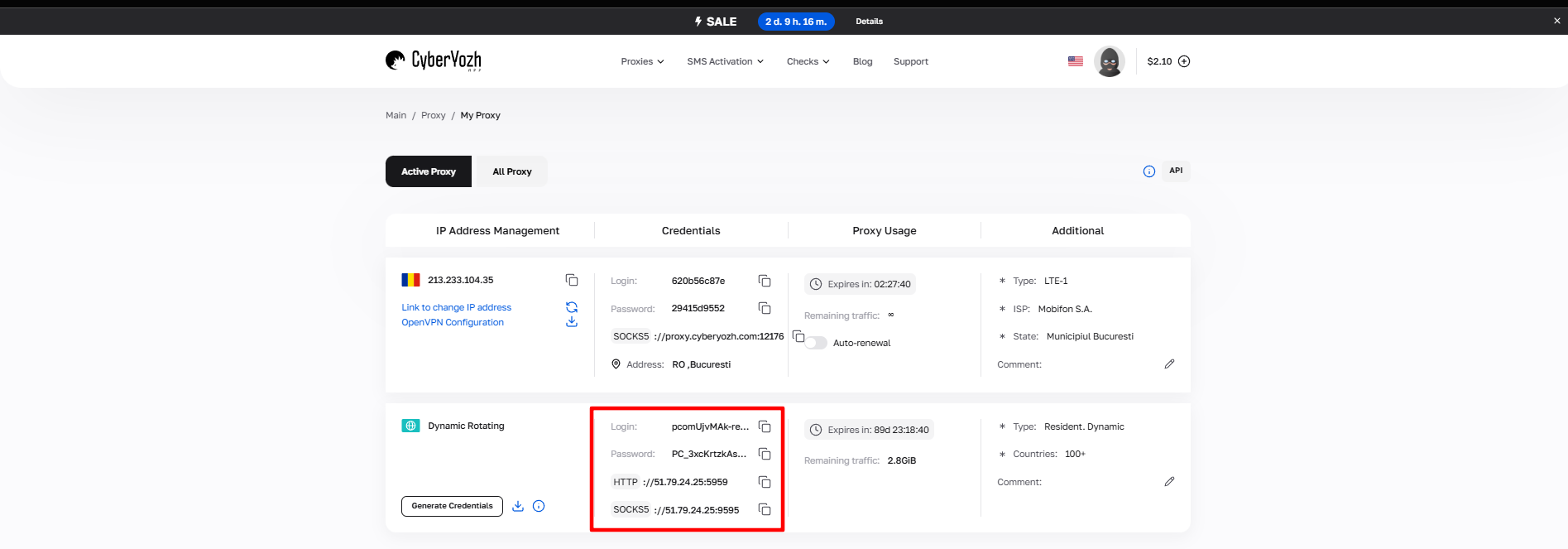
Fig. 1. Screenshot of the CyberYozh platform interface showing the proxy connection data. The image displays fields for IP address (Host), port (Port), username (Proxy Username), and password (Proxy Password).
After payment, you will receive the configuration details:
Host: IP address
Port: Port number
Proxy Username: Login
Proxy Password: Password
Working format example:
Host: 172.98.60.180
Port: 58763
Login: 7XbvvWautzmOZMA
Password: xdtAof3xB7RSmUr
Digital identity quality assessment
Before you initiate the adspower add proxy process, check its Fraud Score. Expensive addresses sometimes carry a negative history from a previous tenant.
Our assessment tool aggregates data from IPQualityScore, CyberSource, and ThreatMetrix. Replace the IP if the risk metric exceeds 75 points. You can easily check IP address parameters right inside the CyberYozh dashboard.
Creating a browser profile
Launch the application.
Click the "New Profile" option in the left main menu.
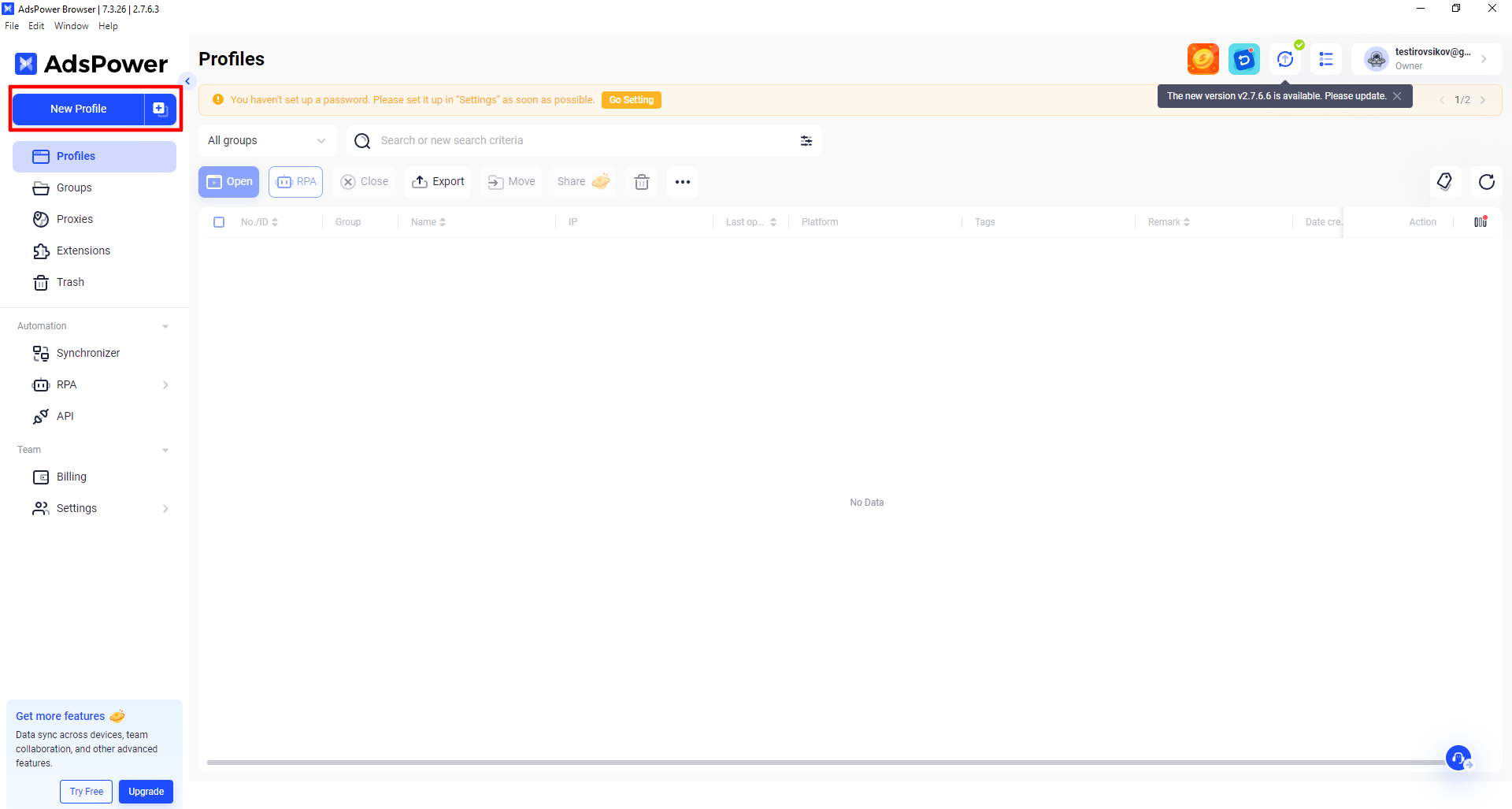
Fig. 2. Interface for creating a new profile in the AdsPower browser.
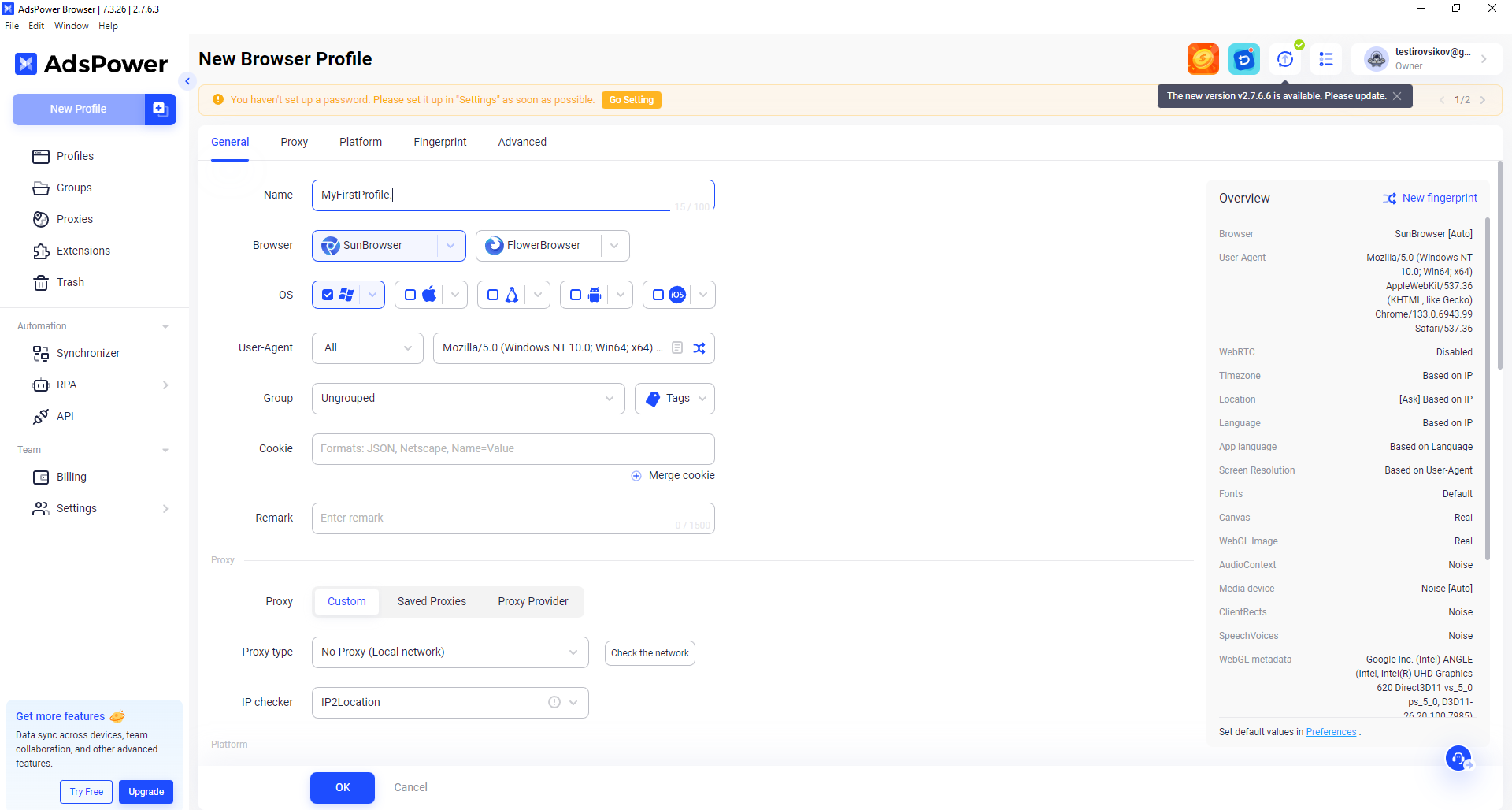
Fig. 3. Profile configuration form in AdsPower with basic parameter fields.
Profile name: Type any custom name (e.g., MyFirstProfile).
Browser: Select the required engine (like the SunBrowser engine).
Operating System: Specify the target OS.
User Agent: Adjust your digital identity parameters.
You can also assign the profile to a specific group, add tags, and upload Cookie files for convenience.
AdsPower proxy setup process
The proxy section supports three key protocols for a stable connection:
HTTP - basic protocol for data transfer.
SOCKS5 - powerful tunneling protocol with reliable authentication.
SSH - network protocol with cryptographic encryption.
This tutorial focuses on an adspower socks5 proxy setup. The configuration logic for other protocols remains identical.
Leave the "Custom" option active. Select your purchased type (SOCKS5 or HTTP). Pick the IP2Location checker for verification.
Enter the obtained data in this exact format: Host:Port, Proxy username, Proxy Password.
Your settings will look like this:
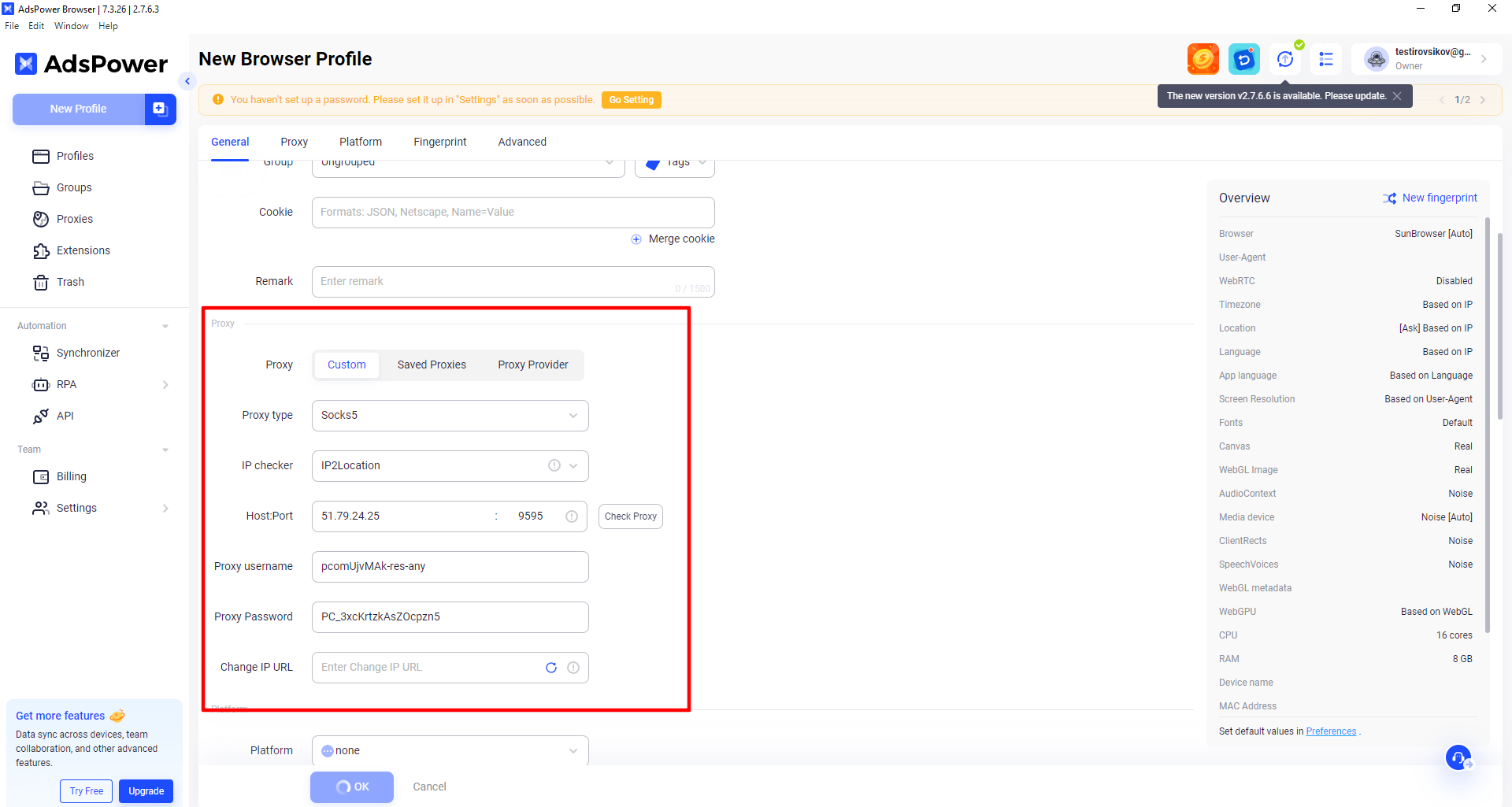
Fig. 4. Proxy settings interface with filled connection data fields.
Click "Check proxy". The text on the right side must turn green.
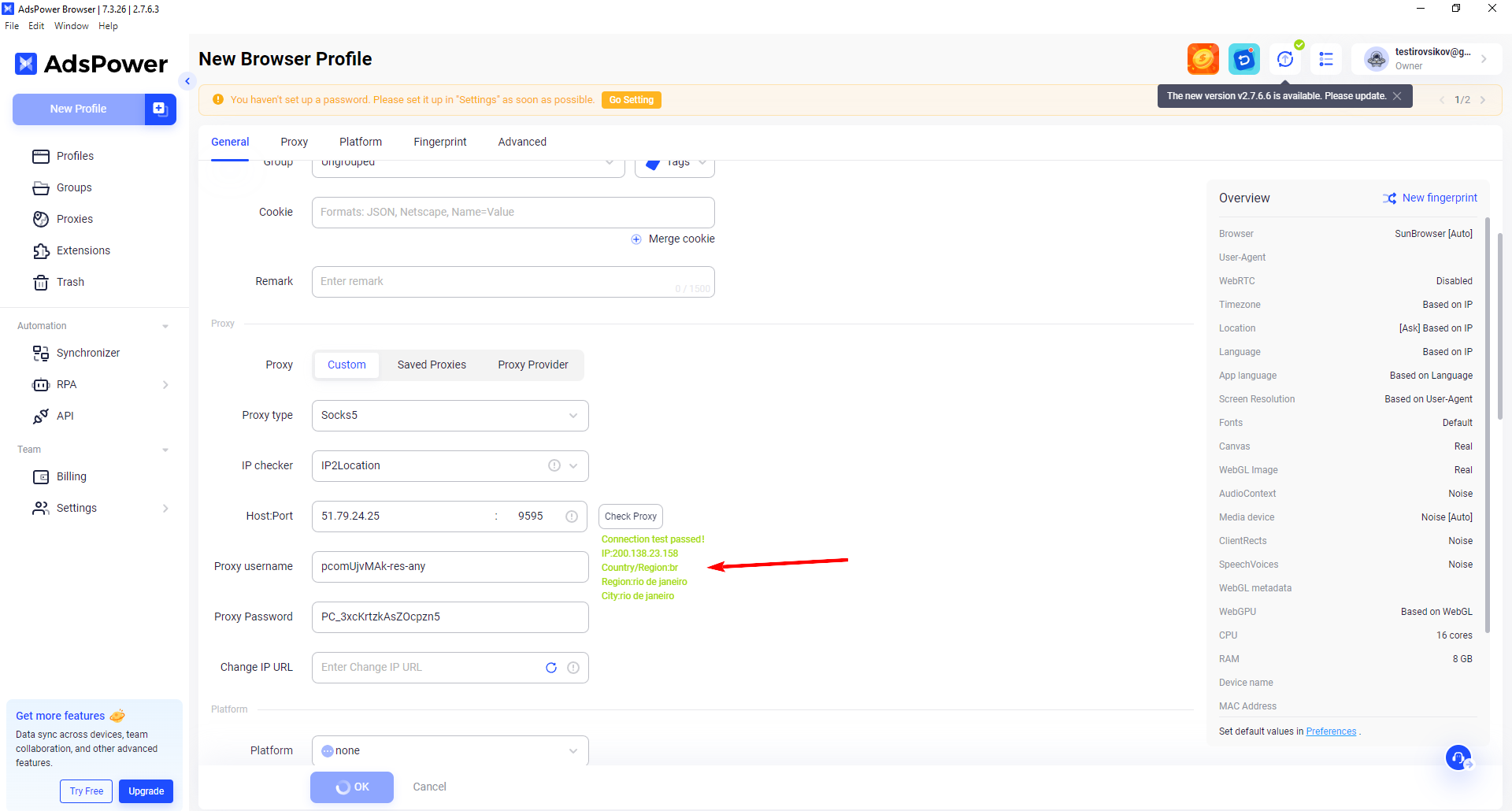
Fig. 5. A green indicator confirms a successful server connection.
A red connection status means you hit an adspower proxy connection failed error. Inspect the entered values closely for hidden spaces.
Environment configuration (Fingerprint)
A standalone adspower proxy setup will not save your profile if the platform detects a technical mismatch. Align the environment to your connection location:
Timezone and Location: Turn on automatic geolocation and time zone synchronization with the IP address.
WebRTC: A local IP leak instantly exposes your real network footprint. Route this traffic exclusively through the rented server for strict WebRTC leak prevention.
Language: Set the language of the target region.
Screen Resolution: Keep your monitor's current resolution.
AdsPower proxy integration via Local API
The browser includes powerful programmatic control features. You can automate the creation of hundreds of profiles by sending JSON requests to the local server. Rotating residential pools fit perfectly into an adspower local api proxy config.
Launching the ready profile
Save the parameters by clicking "OK" and start the system.
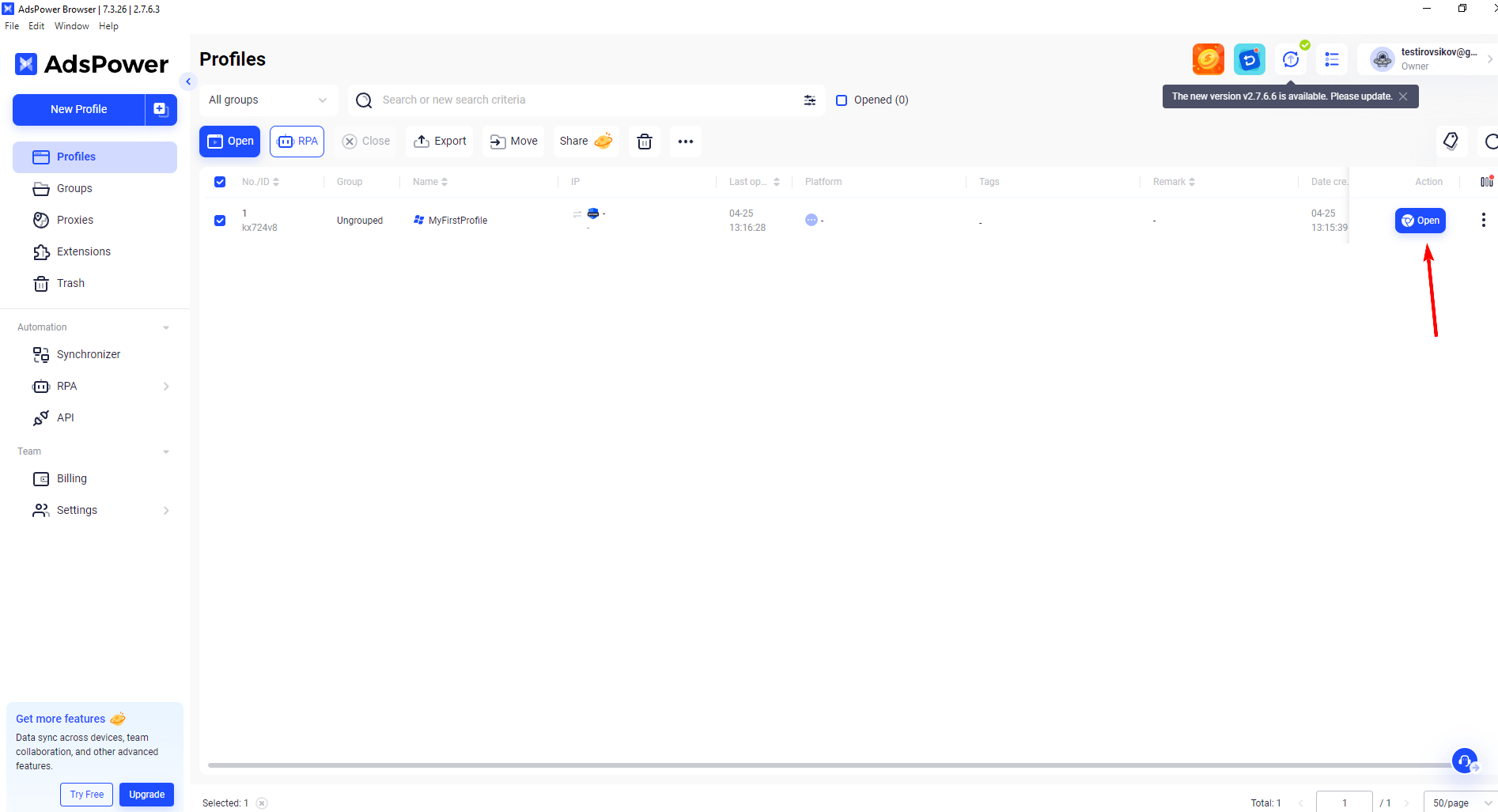
Fig. 6. Final profile setup interface with launch buttons.
Open the BrowserLeaks testing site to definitively verify the IP installation.
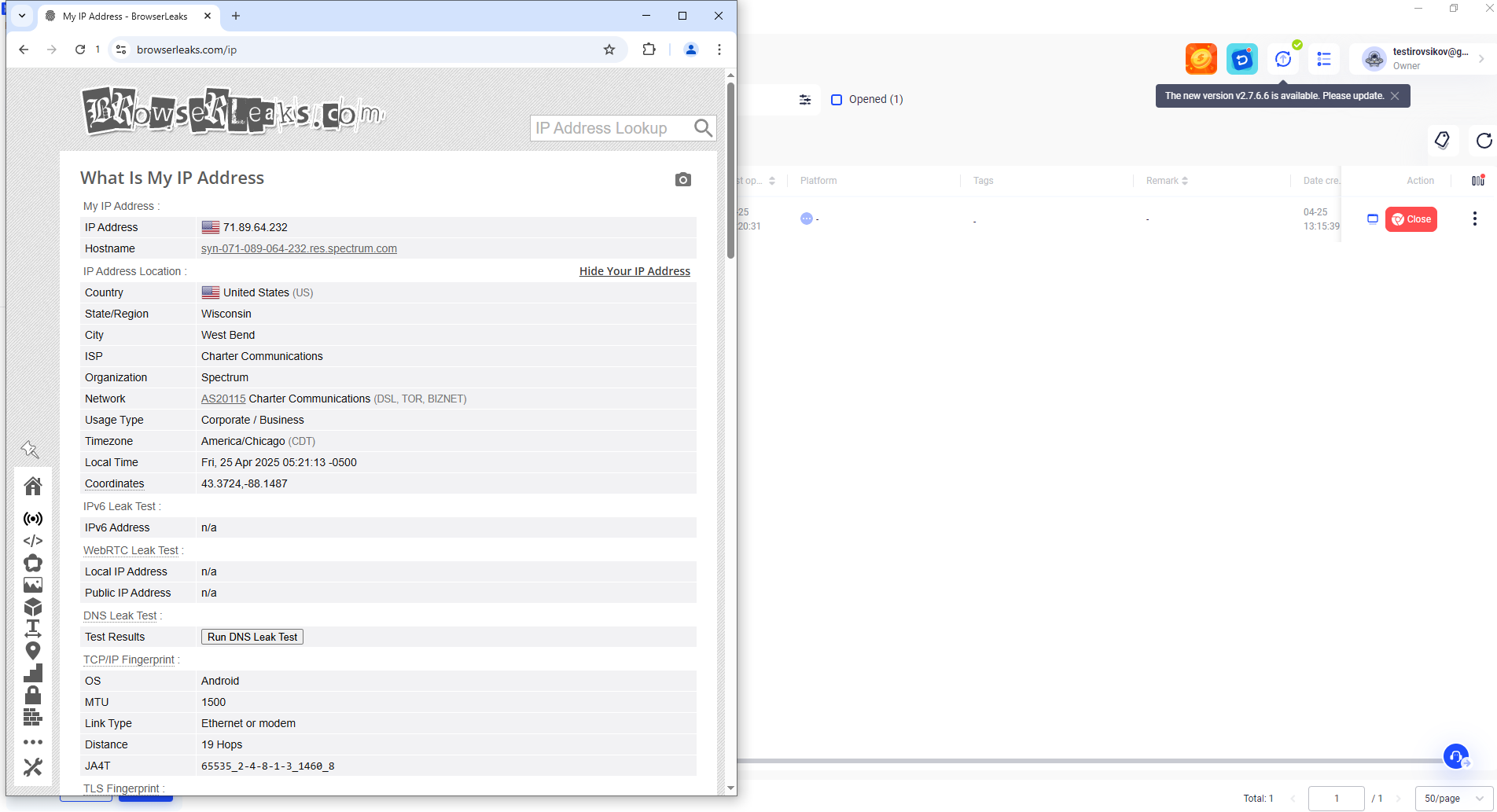
Fig. 7. Server configuration verification through the BrowserLeaks service.
Congratulations. Your adspower proxy setup is now complete.
Profile registration and billing
You just learned how to set up proxy in AdsPower. The next stage involves registering accounts on target platforms and linking payment details.
Corporate services frequently request SMS verification. We advise you to rent a residential number from local telecom operators. This grants a high Trust Rate and guarantees code delivery.
To safely pay for foreign advertising accounts, you can issue a virtual card supporting Apple Pay and Google Pay. Always follow the fundamental rule: tie one browser profile strictly to one unique bank card. A proper adspower proxy setup paired with clean payment data ensures stable operations.