
Proxy for Tinder
Tinder is the largest dating platform, offering great opportunities not only for those seeking a loved one in any country, but also for social media marketers and researchers who need to conduct observations and gather data. To ensure the security of its users, it analyzes not only your IP address but also the "cleanliness" of your phone number, photo metadata, GPS coordinates, and even which bank card was used to pay for a Gold or Platinum subscription.
Here, we’re going to explore how CyberYozh infrastructure can help with that: it has everything you need to convince Tinder that you’re clean.
CyberYozh proxy site for Tinder: A full-scale ecosystem
Before you begin, let’s explore why CyberYozh is so good for Tinder, and which specific tools you’ll need for your tasks.
Mobile or residential proxy: Basic infrastructure
The choice of Tinder proxies determines your trust score from the very first connection.
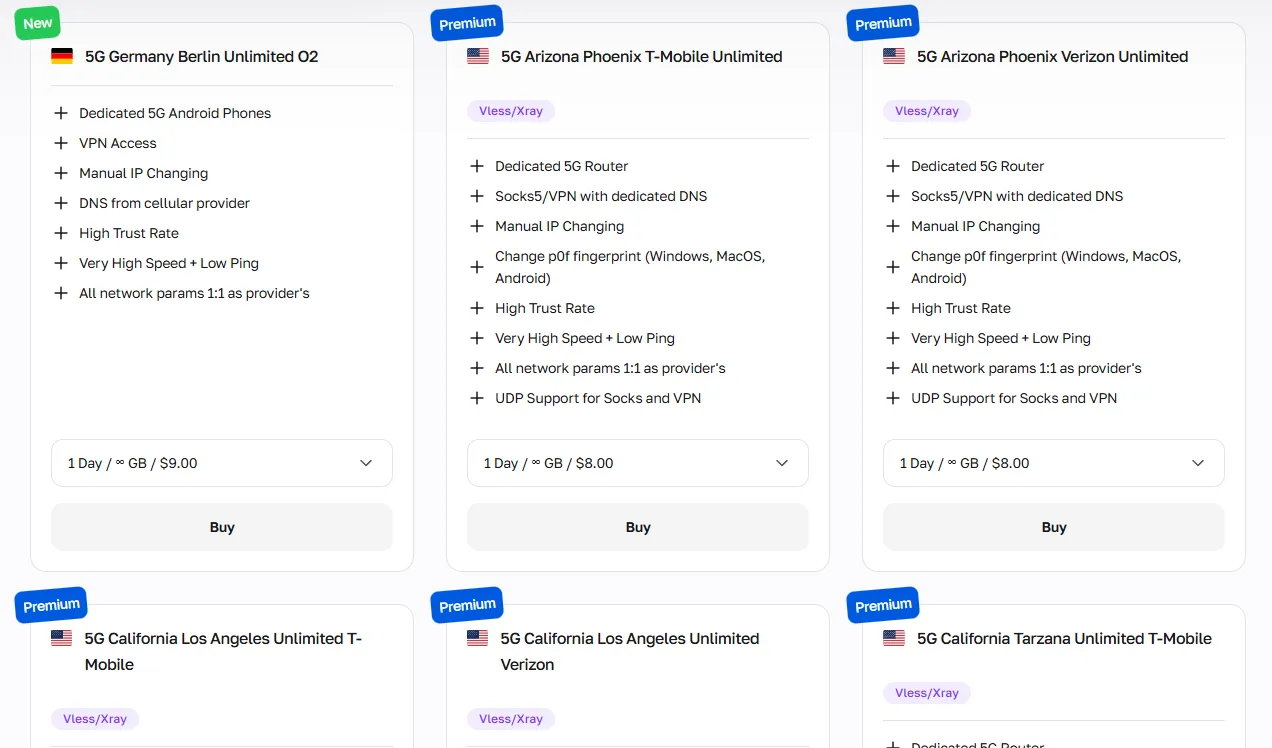
Mobile proxies are the best choice for mobile-first apps like Tinder. They carry the highest trust score because Tinder sees you as a regular carrier user sharing a CGNAT pool. Required for any large-scale Tinder workflow.
Static residential proxies, with 1 IP assigned per account, are suitable for personal use in specific locations where you need a stable, fixed presence.
Rotating residential proxies work for Tinder data scraping. They’re ideal if you're researching dating statistics or regional user demographics.
Datacenter proxies should never be used for Tinder. They are instantly flagged and result in a ban during SMS verification, even before you can start anything.
IP Checker: Automated quality assessment
IP Checker usage is a critical step before using any proxy for Tinder. It evaluates IP reputation and fraud history in real time, so you can immediately replace any low-quality IP before it causes an account suspension.
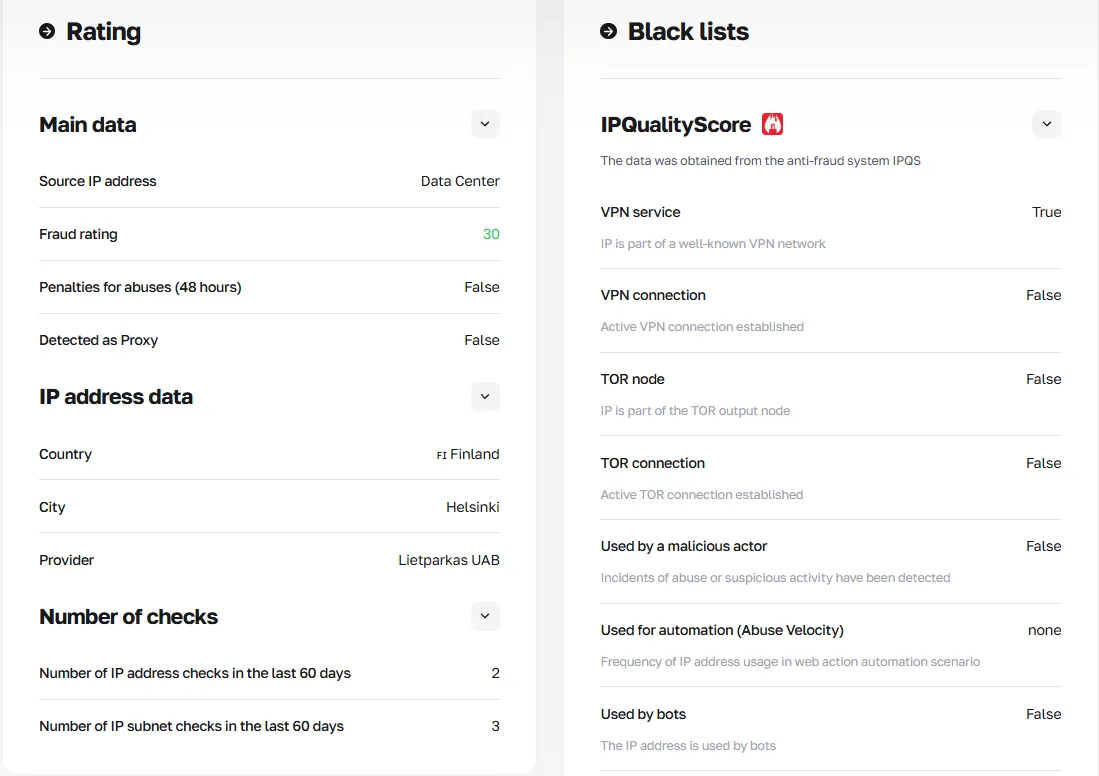
A fraud score is a reputation rating assigned to a phone number based on its spam history. It’s basically a reverse of the IP’s trust score. A high fraud score means Tinder is more likely to flag or shadowban your account immediately.
SMS Service: Fast local verification
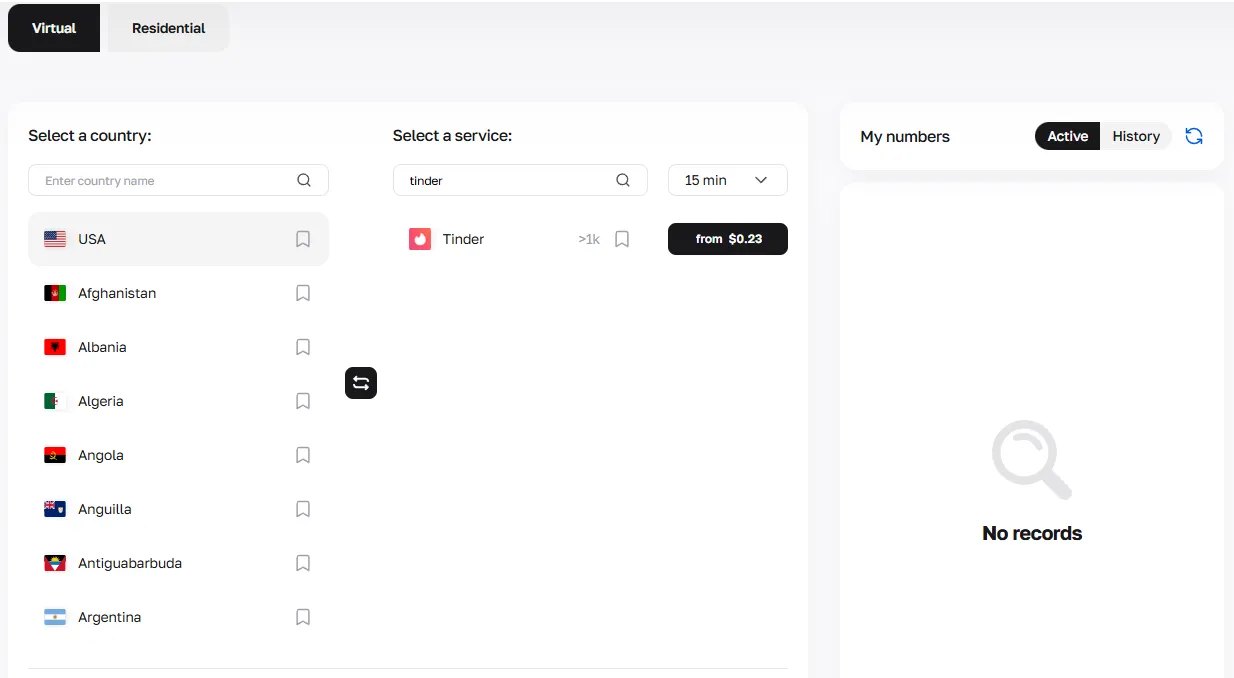
SMS Service provides residential virtual numbers from 140+ countries. It uses real carrier-based numbers indistinguishable from genuine SIM cards. Using a clean proxy phone number for Tinder verification prevents shadowbanning at the first login.
Virtual Card: Isolated local payments
Virtual Card Service of CyberYozh issues cards with BINs matching your proxy's geolocation. Use one local card per account to ensure payments don't create a financial fingerprint linking multiple profiles and leading to restrictions.
Setting up a Tinder proxy
Now you can start setting up your Tinder antidetection infrastructure, as CyberYozh has all the basic tools you need, with full-scale integration with antidetect browsers or cloud phones.
Read more about antidetect browsers and cloud phones on CyberYozh
1. Buy Tinder proxy: Type and geo
To buy a Tinder proxy, create a CyberYozh account, navigate to the proxy catalog, and select a mobile or static residential proxy with the geolocation that matches your target market. For specific Tinder research, select rotating residential proxies.
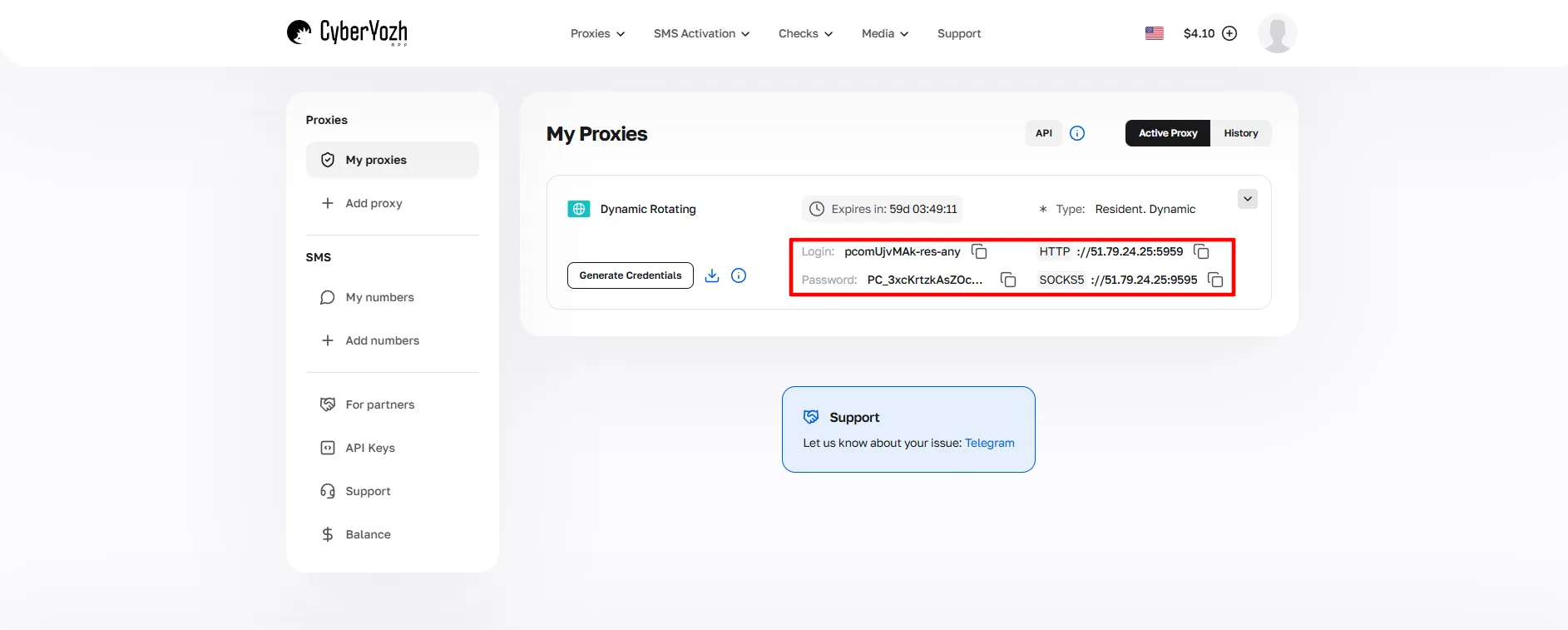
Save the proxy credentials (host, port, login, password). You'll need them in the next step.
2. Set up a proxy: Browser, antidetects, or system-wide
These integration options are available for your proxy Tinder setup:
Browser extension: Works for Tinder's web version in a standard browser. For example, use CybseYozh’s Chrome extension.
System-wide (ProxyCap/Proxifier): Routes all device traffic through the proxy; suitable for basic single-account use.
Antidetect browser or cloud phone (recommended): Creates full fingerprint isolation: each profile gets a unique device identity, independent cookies, and a separate IP. This is the only acceptable method for Tinder multi-accounting.
Explore the antidetect browser setup for DICloak, MoreLogin, Dolphin Anty, GoLogin, and many more. Also, learn more about what is antidetect browser and how to use it in detail.
3. Verifying Tinder account: Using local number
Use CyberYozh SMS Service to obtain a proxy phone number for Tinder in the same country as your proxy. Numbers typically cost under $1, include a fraud score pre-check to ensure the number quality, and are backed by 24/7 support.
4. Service payment: Local card required
Select a CyberYozh virtual card with a BIN matching your proxy geo. Pay for Tinder Gold or Platinum with this card, and not your personal one.
Always use one IP, one number, and one card per one account.
Account warm-up and Tinder proxies integration with antidetects
When everything is ready, it would be a bad idea to start all your planned activities at once. Tinder is more suspicious of new accounts: if it detects bot-like behavior, your account may be banned instantly. Instead, follow this warm-up algorithm before any large-scale usage:
Day 0: Profile setup. Upload unique photos with EXIF metadata cleared. Fill in all profile fields. Do not swipe.
Day 1: Idle pause. Leave the profile untouched for 12–24 hours after creation.
Days 2–4: Light engagement. Log in 2–3 times per day, perform 10–20 swipes per session, and send 1–2 natural messages.
Days 5–7: Gradual scaling. Increase daily swipes to 30–50. Begin short conversations. Avoid sending identical messages or links.
Days 7–10: Trust confirmation. Maintain consistent geo-coordinates between your proxy and GPS signal fingerprint. Keep sessions at varied times of day to mimic human behavior.
After a 7–10 day warm-up, your account has an established behavioral pattern that reads as a legitimate human user, significantly lowering the risk of automated suspension when you begin your actual workflow.
Summary: Using a CyberYozh infrastructure for Tinder activities
The right proxy Tinder stack includes:
Mobile or residential IPs
Verified local number
Isolated virtual card
Checkers to ensure the quality of anything above
With all this infrastructure available, plus a high-quality antidetect browser or mobile phone, your protected Tinder account is ready for geo-targeted marketing, multi-account research, or audience analysis in any country, with minimal risk of bans.
FAQ
What is a Tinder proxy and why do I need one?
A Tinder proxy is an intermediary server that replaces your real IP address with a local one. It enables location changes, multi-account management, ban recovery, and anonymous data collection on Tinder.
Which proxy type is best for Tinder?
Mobile proxies are the top choice for Tinder — they share IPs with real carrier users via CGNAT, making them nearly impossible to block without affecting genuine accounts.
Can I buy Tinder proxy access for multiple countries at once?
Yes. When you buy a Tinder proxy from CyberYozh, you can select different geolocations for each account, enabling simultaneous operation in multiple regional markets.
What is a proxy site for Tinder?
A proxy site for Tinder refers to a provider platform — like CyberYozh — that offers dedicated proxy infrastructure specifically configured and tested to work reliably with Tinder's anti-fraud systems.
Do I need a separate phone number for each Tinder account?
Yes. Tinder tracks phone numbers and links them to accounts permanently. Use a separate residential virtual number per account to avoid cross-account association and instant bans.
Will Tinder ban me for using a proxy?
Using a high-quality mobile or residential proxy with proper fingerprint isolation and a warmed-up account significantly reduces detection risk. Datacenter proxies, however, are flagged immediately.
Can I use a proxy to recover a banned Tinder account?
A proxy alone is not enough. You also need a new phone number, fresh device fingerprint (via antidetect browser or cloud phone), and a new payment card — a full environment reset.
How does a virtual card help with Tinder?
Tinder cross-references payment BINs with account geolocation. A mismatched card triggers suspicion. A local CyberYozh virtual card ensures payment signals match your proxy location.
How long should I warm up a new Tinder account?
A minimum of 7–10 days is required before any high-volume activity. Gradual, human-like engagement during this period builds a behavioral history that reduces the risk of automated bans.
Does Tinder detect antidetect browsers?
Tinder's detection targets device fingerprints and IP quality, not browser type directly. A properly configured antidetect browser with a clean residential or mobile proxy produces a fingerprint indistinguishable from a real device.