
An IP address is not just a technical detail, but a vital part of the digital ecosystem. It can reveal where a device is located, which network it is connected to, and how safe it is to interact with. This information is crucial for businesses, handling transactions, and even everyday internet use. IP address checkers help you understand the reputation your IP address holds in the eyes of security systems. Let's explore how the checker from CyberYozh App helps solve this task quickly and easily.
The Problems with Free Checkers
There are many solutions in the IP address checker market: from well-known players like IpData, IpQualityScore, and MaxMind to less popular services. These tools are in demand by businesses, network administrators, and regular users, but not all of them meet modern requirements. Why? Let's break it down.
Outdated Databases
Many free services provide data that has long been outdated. For example, an IP address database might not be updated for an extended period. Even if its relevance hasn't been checked for just a few days, it can be critical, as an address might still be listed as reliable even though it has long been used in technical networks or botnets.
A simple example: you are using a remote IP address to work with an important financial service. You check it through a free checker, which confirms the address is "safe." However, a few days later, access to the account is restricted because the IP address actually belongs to a data center and previously had a negative activity history. The result? This leads to decreased trust from the platform and temporary work restrictions.
Insufficient Detail and Database Discrepancies
Often, free and even some paid checkers limit themselves to superficial information. They might indicate that an IP "likely belongs to a proxy or VPN," but they don't explain what that means for the user.
It is important to understand that free and paid versions of even the same service (for example, IPQualityScore) can show completely different data. Free versions often use "lightweight" or cached databases, while paid access (Enterprise-level) opens up up-to-date registries with deep verification. A free checker might show an IP is clean simply because its "stripped-down" database hasn't yet received the update that is already in the paid version. Reliability is only guaranteed by full paid access to databases.
Imagine you are using an IP address to register an account on a major marketplace. If the security system detects through its own (paid) databases that this address has a low reputation, and your free checker didn't see it, it might request additional verification. For a business, this is a risk: process delays and potential loss of customers.
Limited Data Sources
Some services pull information from only one source, such as old geolocation databases or public reputation lists. This creates a distorted picture. For instance, an address with a high level of reliability in such a checker might turn out to be a data center IP rather than a real user.
To clarify: a data center IP is like a virtual office. It is suitable for certain technical tasks but may not be fit for working with platforms that require connections from Internet Service Providers (ISP) or mobile operators.
Narrow Specialization
Most available IP address checkers focus on one specific function:
One tool allows you to accurately determine where an IP is located. Another finds out the reputation of that IP. A third evaluates the risk level (Fraud Score) associated with the address.
This approach requires using several different services for a full IP address check, which is not always convenient. If you need to make sure an IP is suitable for work, you will have to separately check its geolocation, history, and security parameters. This is not only time-consuming but also increases the likelihood of errors.
That is why we created the IP address checker in CyberYozh App. It offers the convenience of integrating all necessary verification functions into one tool. The checker effectively analyzes IP addresses across multiple parameters, using up-to-date data to provide a detailed report. This saves you time and provides full information about the characteristics of the analyzed IP, simplifying important decisions in the online space.
Advantages of the CyberYozh App Checker
Our IP address checker is designed to simplify the process of obtaining information as much as possible. With its help, clients can get a comprehensive and detailed report on an IP address with literally one click, helping them make an informed choice quickly.
We do not rely on random sources. Our checker uses aggregated data from leading paid analytical databases, including IPQualityScore (IPQS), MaxMind, ipdata, and other authoritative services. This allows us to provide data with a high degree of accuracy that is unavailable to standard free tools. Every element of the report—from geolocation to IP usage history—is carefully verified against commercial databases.
Thanks to the wide range of analyzed parameters, our checker gives clients the full picture, providing all the data needed for balanced and objective decisions. This makes the tool not just functional, but effective in solving tasks related to quality analysis and IP address authentication in various usage scenarios.
Simple Instructions for Checking an IP Address via Our Checker
To use the IP address checker as effectively as possible, you will need to follow a simple three-step procedure:
- Go to the checker page Use any web browser and open the CyberYozh App IP checker page by following the link. If the exact address is unknown, just find it on Google by typing "CyberYozh App check ip."
- Paste the IP address into the field On the checker page, you will see a text field intended for entering an IP address. You will need to copy the desired IP address and paste it into this field. Make sure the address is entered correctly to avoid errors in the check result.
- Press Enter and get the result After entering the IP address, click the "Check" button or simply press the Enter key on your keyboard. The system will process your request and provide a detailed report on the status and characteristics of the IP address in a few seconds.
This report may include information about the IP's geolocation, its affiliation with a specific internet provider, whether the address is associated with any activity tags, or if it is on low-reputation lists. Using this data, you can make informed decisions regarding the further use of this IP address for your purposes.
Detailed Report Overview
To evaluate connection quality, it is important to consider several parameters at once. Our checker helps to quickly and accurately analyze an IP address, providing all the necessary information for balanced decisions. Below, we describe exactly which parameters are included in the report and why they are important.
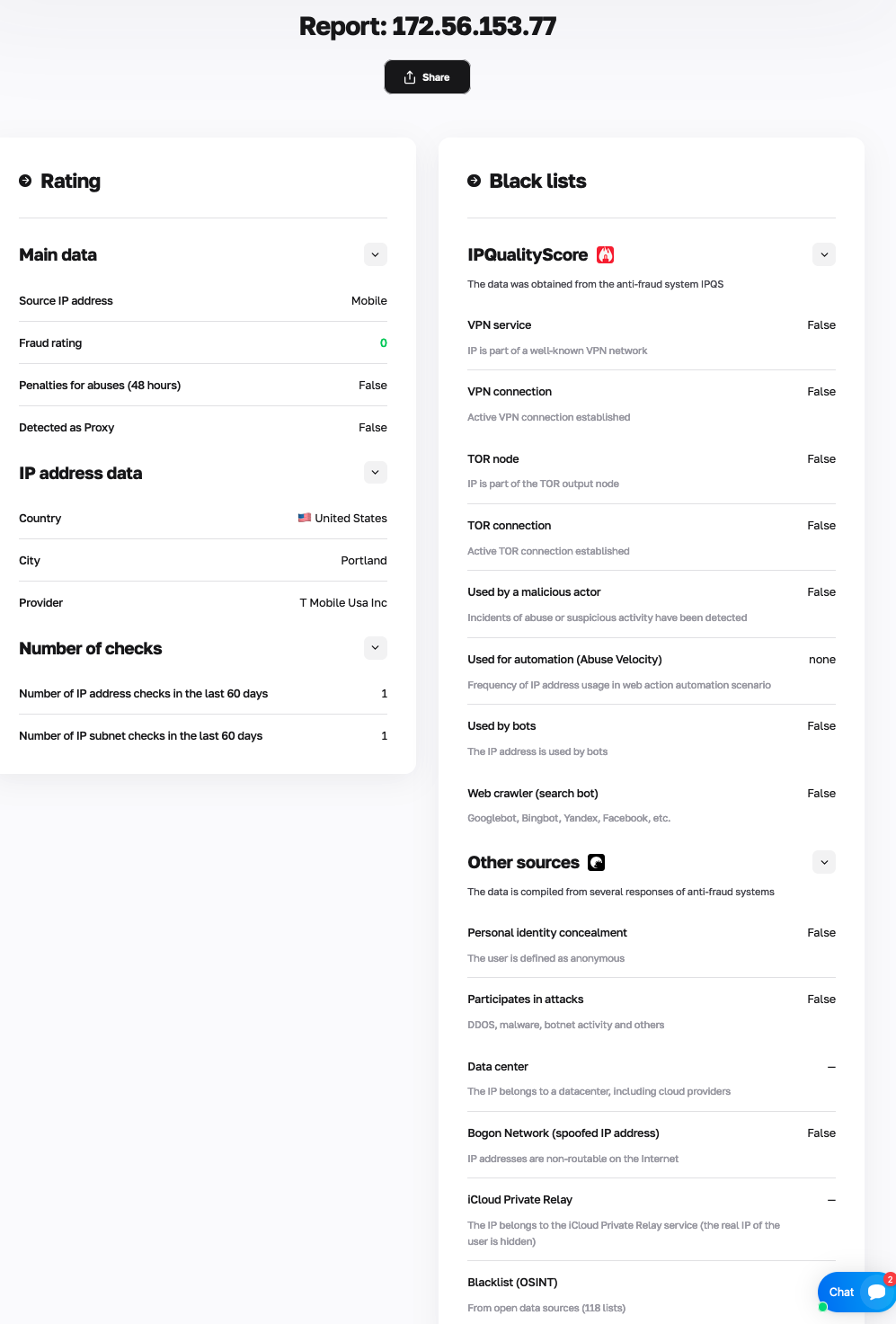
Fig. 1. IP address check result using the checker from CyberYozh App.
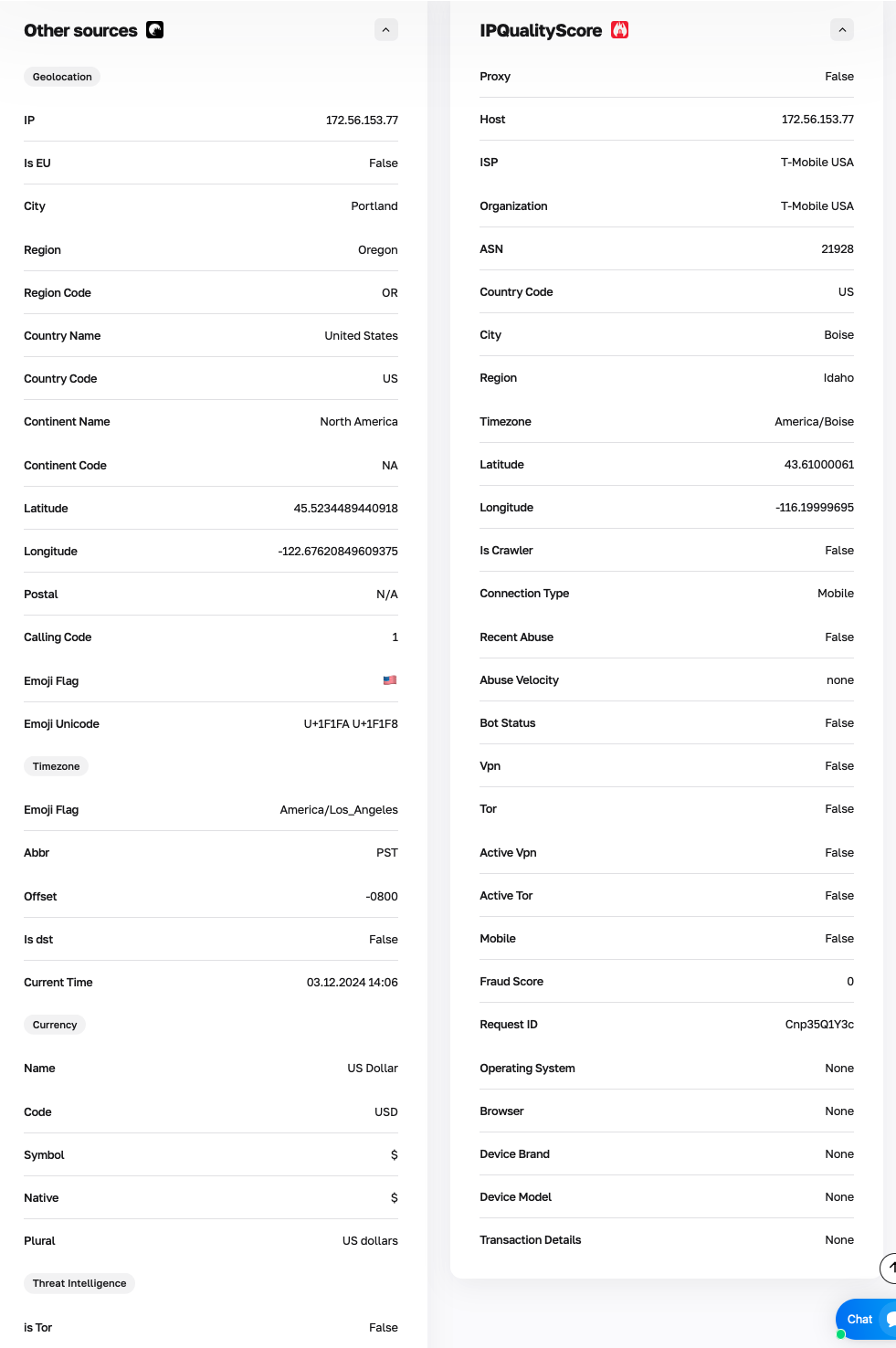
Fig. 2. Additional information in the IP address checker report.
IP Address Source. The checker determines if the address belongs to a data center, hosting, or is residential. For example, IP addresses from data centers might not be suitable for tasks requiring an ISP-type connection (home internet), unlike mobile or residential IPs.
Risk Rating (Fraud Score). This parameter shows an assessment of the IP address's reputation. The lower the indicator, the "cleaner" the IP history. For mobile connections, the ideal value is close to zero; for residential ones, it should be below 70.
Abuse Penalties (Last 48 Hours). The presence or absence of incidents over the last two days can say a lot about recent IP activity.
Detected as Proxy. This parameter indicates whether the address is classified as a public proxy server. For tasks requiring a high degree of trust, the absence of proxy tags is preferable.
Country, City, Provider. Data must exactly match the stated information. This is important for tasks where correct geo-targeting is required.
Number of IP Address and Subnet Checks in the Last 60 Days. Check statistics help understand how often this address has been analyzed by other users, which can indirectly indicate its popularity or usage.
The "IP is part of a known VPN / TOR network" parameter shows if the address is linked to anonymous networks. For many business tasks, the value should be False, as IPs from such networks may require additional verification on platforms. An address without links to VPN or TOR is perceived by systems as more transparent, ensuring work stability.
Used by Bots. Indicates the presence of automated activity associated with this address.
Current Time. Displaying the current time according to the IP's time zone helps ensure system settings are correct and avoids localization errors when working with remote services.
Additional Features
The checker also provides the ability to "Share" the report. By clicking the corresponding button, you can copy a link to the report to save for yourself or send to colleagues.
Fig. 3. "Share" button for the IP address check result.
Additional Tools: In addition to IP addresses, CyberYozh App also offers checkers for phone numbers and bank BIN numbers. These tools allow for a comprehensive assessment of data security and validation. This approach helps minimize technical risks and protect your processes.
Who Needs Checkers
The IP address checker from CyberYozh App is designed to solve tasks for a wide variety of users:
- Business. For companies operating online, it is important that their IP addresses meet corporate security requirements.
- Marketers and Advertising Specialists. To check IP quality for setting up advertising campaigns and complying with the technical requirements of ad networks.
- E-commerce Companies. To check IP reputation when working with marketplaces or clients to guarantee transaction stability.
- Financial Organizations. To evaluate IP addresses for risks and use reliable addresses for working with payment gateways.
- Online Service Developers. To test connectivity and application performance in different regions, ensuring stability and availability.
- Freelancers. Professionals working with international clients often face geolocation requirements. The checker allows them to:
- Check if an IP meets the requirements of remote work platforms.
- Ensure stable and secure access to corporate systems.
- Make sure the connection used won't cause technical issues when logging into work accounts.
- System Administrators. Specialists responsible for network management and security can use the checker for:
- Analyzing public (external) IPs for presence in reputation lists.
- Monitoring the status of server IPs to maintain their correct operation.
- Identifying IPs classified as bots or anonymizers to configure security filters.
- Individual Users. The checker is also useful in daily life, helping to control one's digital footprint:
- Checking connection security when connecting to public Wi-Fi networks.
- Making sure the current IP doesn't have a negative history.
- Selecting high-quality IP addresses for tasks where a stable and trusted connection is important.
Summary
Errors related to data quality are costly: lost time, access restrictions, missed opportunities. This is especially felt when you depend on online platforms or conduct important operations. A lack of verification in such cases is a risk. Most importantly, such problems can often be prevented.
The CyberYozh App Checker is a tool for those who value stability in every connection. Instead of acting on guesswork, you get clear data (including information from paid IPQS, MaxMind, ipdata databases, etc.) that helps ensure compliance with platform requirements and maintain uninterrupted access to vital services.
One check is enough to see the full picture. Try our IP address checker and see for yourself that data control is your comfort zone.
