
Have you ever faced a restriction on an advertising account that you’ve poured weeks of work into? Based on the experience of many marketers, these situations often occur not because of the quality of the content, but due to the reputation of the network and the IP address.
Choosing an unreliable connection is a common mistake. In this guide, we will analyze how to correctly choose, configure, and purchase private proxies on the CyberYozh App platform so that your projects run stably and securely.
Why do professionals choose CyberYozh App?
Unlike public shared proxies with low stability, we provide infrastructure for professional tasks:
- 🛡️ Private Modems: We use dedicated channels. This means you are the sole user of the resource. The actions of other users will not affect the stability of your IP.
- 🚀 UDP Support and Full Tunneling: An important parameter for working with complex network protocols and streaming. It allows for the correct routing of all traffic.
- 🕵️ Native DNS: DNS queries are processed by the provider, ensuring a high degree of privacy and a natural connection profile.
- 📱 CGNAT Technology: For mobile proxies, we use cellular operator standards. Your traffic looks identical to the traffic of thousands of real subscribers, which increases trust from services.
Instructions for Purchasing Proxies
Step 1: Registration and Login
If you don't have an account yet, go through the quick registration.
Log in using the credentials provided during account registration.
Tip: Be sure to confirm your email for full account activation and access to all features.
Step 2: Topping Up the Balance
To rent a proxy, you must have funds in your account.
1. Go to the Finance section (plus icon).
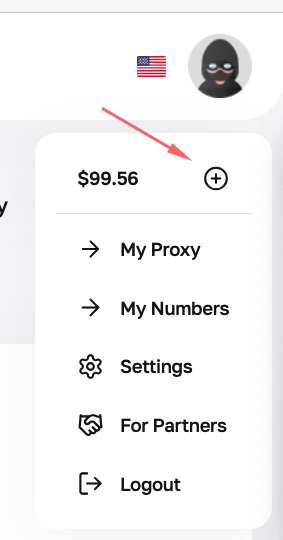
Fig. 1. Screenshot of the Finance section interface, balance top-up button.
2. Select the top-up amount and a convenient payment method (cards, cryptocurrency, etc.).

Fig. 2. Window for selecting payment method and top-up amount.
3. Follow the instructions of the payment gateway.

Fig. 3. Display of the user's current balance in the top right corner of the site.
Your current balance is always displayed in the top right corner of the interface.
Step 3: Choosing the Proxy Type (The Most Important Stage)
At this stage, it is important to accurately define your goals. We have divided proxies into categories so you know what to choose:
| Proxy Type | Features | Ideal for... | Not suitable for... |
|---|---|---|---|
| 🏢 Datacenter | Static IP, very high speed, affordable price. Hosting provider IPs. | Public data scraping, technical tasks, software testing, accessing public content. | Registering social media accounts, SMM, working with demanding platforms (may require additional verification). |
| 📱 Mobile | Dynamic IP (change via link or API), cellular operator IPs (4G/5G), high service trust. | Social networks, Managing advertising campaigns, Working with multiple profiles. | E-commerce, Payment systems (where a static IP is required for session security). |
| 🏠 ISP Static Residential | Unchanged home provider IP. High stability, no rotation. | E-commerce (Amazon, eBay), Crypto exchanges, Payment systems, personal advertising accounts. | Tasks requiring frequent IP address changes. |
| 🔄 Residential Rotating | Access to a vast IP pool. Change the address on request, choosing from over 120 countries. Credentials generator. | Marketing analysis (prices, products), SEO monitoring, content aggregation, ad testing in different geos. | Logging into accounts with long authorization (IP change may interrupt the session). |
Once you have decided on the type, go to the proxy catalog to purchase.

Fig. 4. Proxy type selection process.

Fig. 5. Product card with rental period selection and purchase button.
Important recommendation: The proxy's geo-location should match the registration region of your profile. This ensures connection stability and avoids unnecessary security checks.
Step 4: Obtaining Access, Setup, and Usage
After payment, you will be taken to your personal account with access data.
What you will receive:
- IP (Host) & Port: Connection address and port.
- Login & Password: Authorization data (for Residential Rotating proxies, a credentials generator is available, allowing you to create unique accesses for different tasks).
- Proxy Data Export: A .txt file generator with data for easy integration with various software.
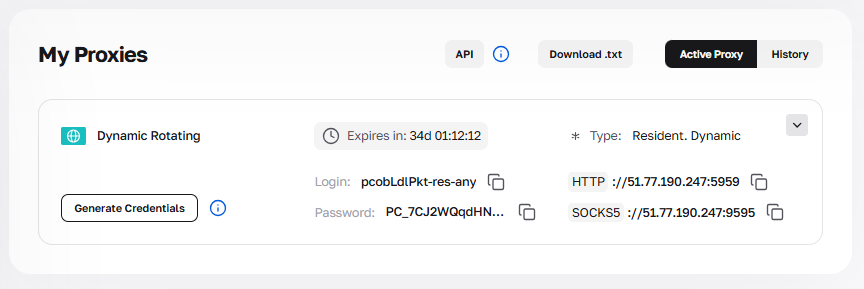
Fig. 6. Control panel with connection data and access button to the credentials generator.
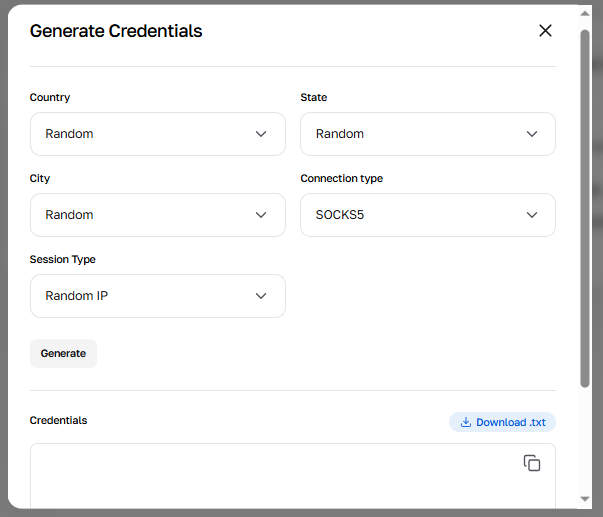
Fig. 7. Generator menu for creating proxy lists with targeting settings by country, region, and city.
How and where to use this data?
We have detailed guides for every scenario. Choose your option:
1. Specialized Browsers (for marketing and profile management) This is a reliable way to work. You configure the connection parameters in the profile, which ensures correct interaction with web resources. 👉 Instructions for setup in specialized software.
2. Regular Browsers (Chrome, Firefox, Opera) Suitable for everyday tasks. Can be configured via system settings or extensions (e.g., FoxyProxy). 👉 Browser setup guides
3. Proxy Clients (Proxifier, ProxyCap) If you need to route a separate program (messengers, applications) through a proxy that doesn't have its own network settings. 👉 Setting up Proxifier and analogues
4. For Developers (Python, Node.js) Integrating proxies into code for analytics gathering and automation. 👉 Code examples with proxy integration
Advanced Connection: VPN and VLESS
For those who need a full encrypted channel or ease of use, we provide Mobile proxies with support for:
- OpenVPN configs (.ovpn): Download the file and run it in OpenVPN Connect. All device traffic will be protected.
- Vless/Xray: A modern protocol that is ideal for stable access to information and use in specialized applications.

Fig. 8. OpenVPN configuration download buttons in the personal account.
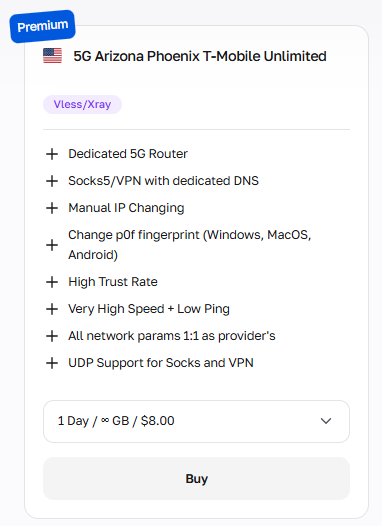
Fig. 9. Product card in the Mobile Proxies section with Vless/Xray badge.
⚠️ Common Mistakes
Mistake #1: Datacenter proxies for social networks. Users often choose datacenter proxies because of the price. However, social platforms may request additional verification for such IPs. For working with social networks, mobile proxies are recommended.
Mistake #2: Rotation where static is needed. Using dynamic proxies to log into sensitive services (PayPal, Crypto exchanges, business accounts). Solution: Choose ISP Static Residential proxies or Mobile dedicated ports, where the connection is stable and the IP only changes at your request.
Mistake #3: Ignoring privacy settings.
A proxy changes the IP, but not other browser parameters. If you work with multiple accounts without clearing cache/cookies, access may be restricted. Use tools for profile isolation.
FAQ: Frequently Asked Questions
Q: What is IP rotation?
A: This is the process of changing the external IP address. On mobile proxies: A modem reboot or session change occurs. This can be done manually or automatically. On residential rotating: Every request goes through a new IP. This is useful for analytics: process data from one session -> change IP -> move to the next stage.
Q: Do you support UDP?
A: Yes! Our SOCKS5 proxies support the UDP protocol, which ensures correct transmission of traffic. This is necessary for voice chats, online games, and specific software.
Q: What if the proxy stops working?
A: We guarantee high stability (uptime). If technical difficulties arise on our side, support will promptly help resolve the issue.
👉 Ready for safe work? Ensure the reliability of your projects. Go to the CyberYozh App catalog, choose the right plan, and set up a secure connection today!
Still have questions? Write to us using any method convenient for you.
