
Antidetect browser
Octo BrowserIntegration with CyberYozh App
Fully Supported
Browser Support
Chromium
Team Collaboration
Team collaboration
Security
End-to-end encryption
Starting Price
€7/month
Separate connections for every profile
Use CyberYozh proxies with Dolphin Anty to give each browser profile its own network connection. Choose real mobile carrier IPs for account-sensitive workflows or residential proxies for broader location coverage.
• Real LTE/5G mobile IPs for account-sensitive profiles • Quality filtering for residential IP selection • Unlimited traffic on mobile and static residential proxy plans • 100M+ residential IPs across 195+ countries • Manual or API-based IP changes to control sessions

Dolphin Anty keeps browser profiles separate, but each profile also needs a suitable network connection. CyberYozh lets you assign mobile, static residential, or rotating residential proxies based on the task, then manage IP quality, location, and session behavior as your setup grows.
Clean Residential IPs
Advanced Session Control
Precise Geo Targeting
Automation Ready
High Success Rate
API Access
Dolphin Anty users choose CyberYozh for the infrastructure behind multi-account management, scraping, ad verification, and automation. Everything works together in one ecosystem, helping teams manage operations more efficiently.
• High-quality proxy infrastructure • SMS activation services • Virtual cards for payments • Tools for scraping and ad verification • Built for multi-account operations and automation
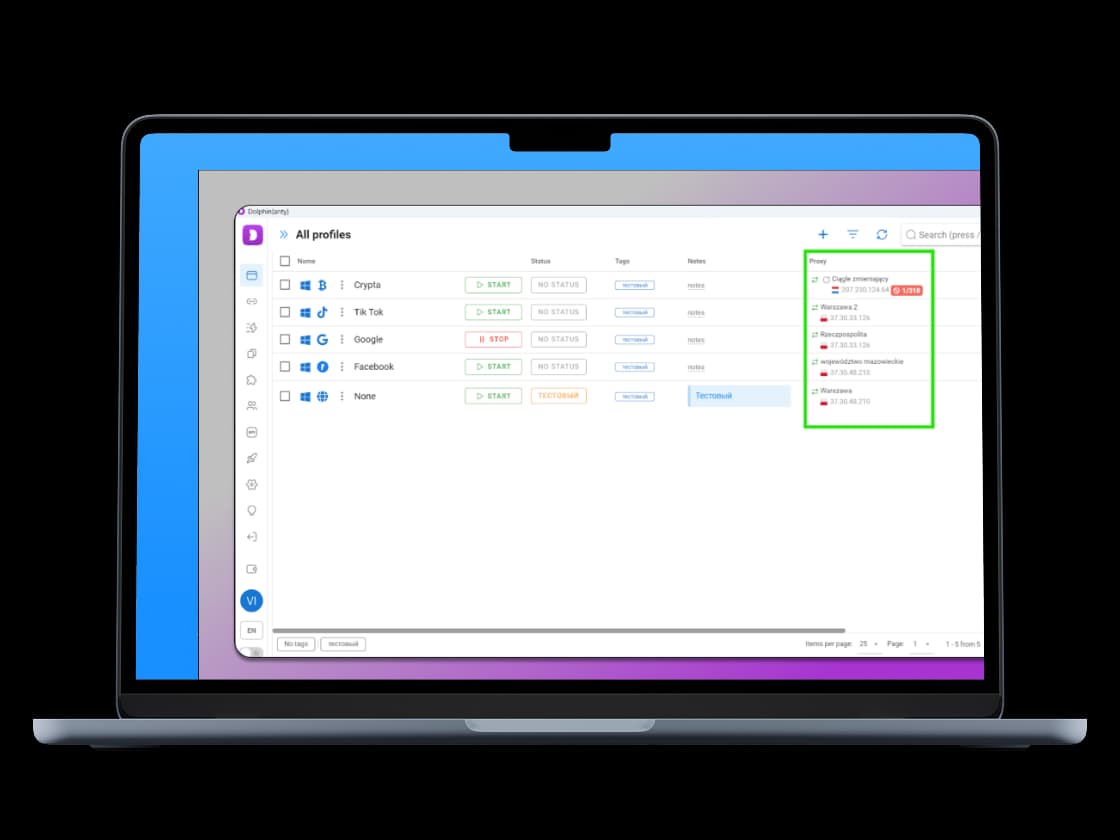
CyberYozh proxies integrate with all major antidetect browsers. Choose the browser you trust for fingerprint management, and power it with stable residential infrastructure built for scaling.
Dolphin Anty is an antidetect browser, a tool that lets you run multiple browser profiles on one device, each with its own isolated fingerprint, cookies, session history, and identity. Every profile looks like a completely separate user to any website or platform you visit.
It's built for media buyers, affiliate marketers, e-commerce teams, social media managers, and anyone who needs to manage multiple accounts with Dolphin Anty across separate browser profiles.
Dolphin Anty lets you customise fingerprint parameters, user agent, timezone, canvas, WebGL, WebRTC, fonts, and more, so each profile looks like a distinct device in a distinct location.
Dolphin Anty separates browser profiles; CyberYozh provides their proxy connections.
Assign a separate proxy to each profile you want to keep distinct.
Use mobile LTE/5G proxies for mobile-focused social and ad workflows.
Use static residential IPs when a profile needs a consistent connection.
Use rotating residential proxies for web scraping and market research.
Check the IP and location in each profile before starting work.
Setting up proxies for Dolphin Anty? Use code CYBERYOZH20 for 20% off your first CyberYozh proxy purchase.
Dolphin Anty changes what the platform sees at the browser level. A proxy changes what the platform sees at the network level. You need both. Without a proxy, all your profiles share the same IP address, which is the clearest signal platforms use to link and ban accounts.
Account linking across profiles sharing the same IP
Platform bans triggered by multiple accounts from one location
Geo-detection mismatches between your fingerprint timezone and actual IP location
Session contamination when profiles share network identity
IP reputation checks run by platforms like Facebook, TikTok, and Google
Read our Dolphin Anty antidetect browser review.
The rule is one proxy per profile. Anything else undermines the reason you're using an antidetect browser in the first place. Dolphin Anty's built-in proxy manager makes this straightforward; each profile stores its own proxy credentials separately.
CyberYozh provides mobile, residential, and datacenter proxies for Dolphin Anty users who manage multiple browser profiles, run multi-account ad operations, automate workflows, and need stable per-profile network isolation at scale.
Mobile and residential proxies with unlimited bandwidth options
100M+ residential IPs pool across 195+ countries
Sticky sessions for consistent per-profile IPs
Rotating sessions for scraping and automation workflows
UDP, SOCKS5, and HTTPS protocol support, all compatible with Dolphin Anty's proxy manager
Real carrier mobile LTE/5G proxy traffic for high-trust platforms
City-level targeting for precise geo-matching with fingerprint settings
API-ready infrastructure for bulk profile and proxy management
Most budget-friendly option in the proxy market
No KYC required, crypto payments accepted
Check out CyberYozh proxy plans for free
The whole setup takes under five minutes.
Log in to your CyberYozh dashboard and copy your proxy details: host, port, username, and password.
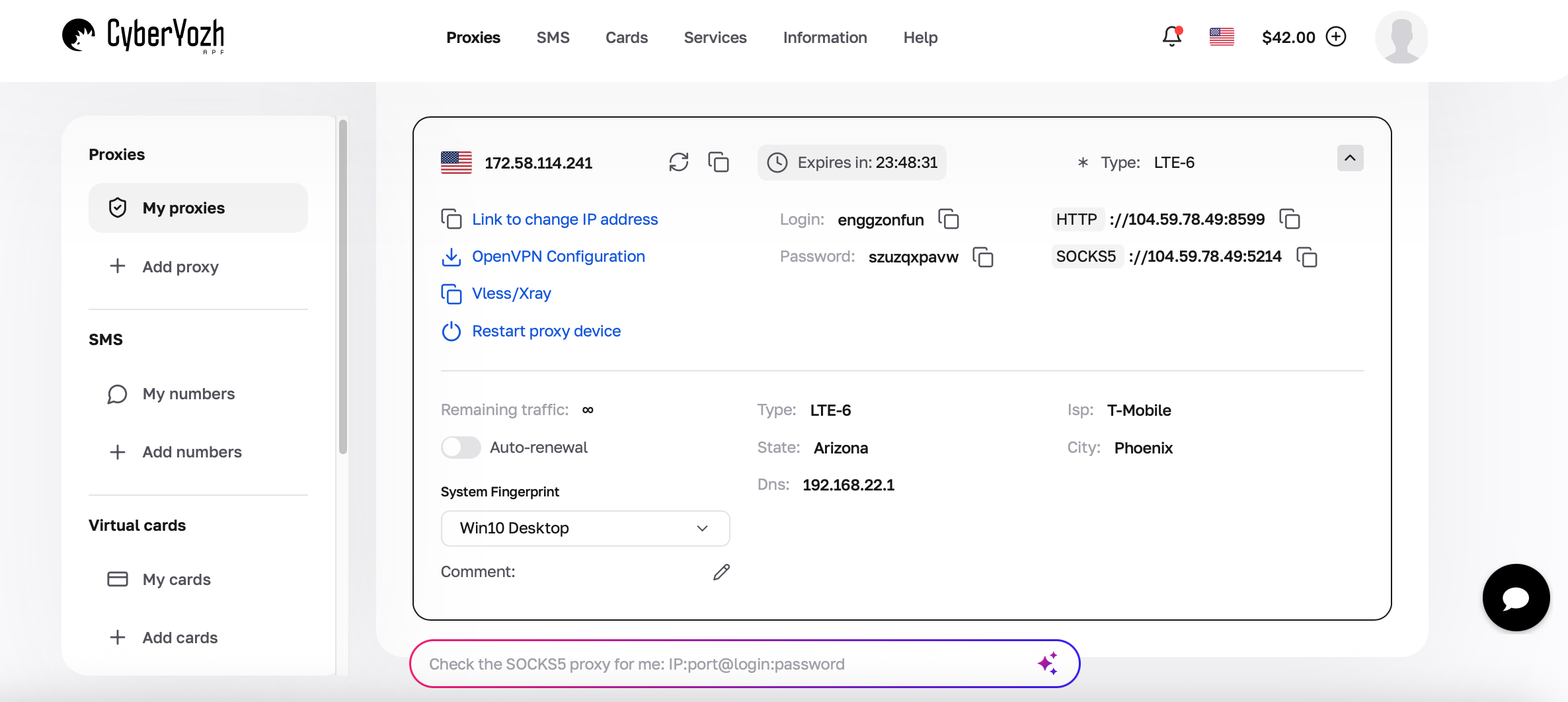
Keep this tab open and paste rather than retype; manual entry causes most authentication errors.
Launch Dolphin Anty and click the Proxies tab in the left sidebar.
This is Dolphin Anty's built-in proxy manager where you store and organise all your proxy credentials separately from individual profiles.
Click Add Proxy (or the + button depending on your version).
You'll see a form for entering proxy details.
Give the proxy a clear name, something like CY-US-Resi-01, to make it easy to identify later when assigning it to profiles.
From the proxy type dropdown, select SOCKS5.
This is the recommended protocol for most Dolphin Anty workflows; it handles both TCP and UDP traffic and performs well for continuous sessions.
HTTPS works too if your use case requires it.
Paste your Host, Port, Username, and Password from your CyberYozh dashboard.
Double-check for any extra spaces copied accidentally; they're a common cause of failed authentication.
Hit Check Proxy.
Dolphin Anty will test the connection and, if successful, display the detected IP address, location, and proxy type.
A green result means everything is working. A red result means a credential error or the proxy has expired; go back to Step 5.
Go to your profile list, open or create a profile, assign the proxy from your saved proxy list, and click Start.
Once the profile launches, optionally visit BrowserLeaks.com or BrowserScan.net inside the profile to verify the IP, location, and fingerprint are all consistent.
For step-by-step setup instructions, read the full guide to integrating CyberYozh proxies with Dolphin Anty!
Issue | Cause | Fix |
Connection failed | Wrong host or port, or proxy has expired | Re-copy credentials from CyberYozh dashboard; check if the proxy is still active |
Authentication failed | Incorrect username or password | Paste credentials directly; don't retype manually; check for extra spaces |
Real IP showing instead of proxy IP | VPN or another proxy extension is active simultaneously | Disable any active VPN or proxy tool before launching the profile |
Wrong location detected | Correct IP but geo-mismatch between fingerprint and proxy | Match your Dolphin Anty fingerprint timezone and language to the proxy country |
Proxy timeout | Proxy server unreachable or pool exhausted | Switch to a different IP from your CyberYozh pool; check dashboard for server status |
DNS mismatch / WebRTC leak | WebRTC settings not configured correctly in profile | Set WebRTC mode to Disabled or Real in Dolphin Anty profile settings |
Red proxy status after saving | IP flagged, session expired, or credentials rotated | Generate a fresh proxy from your dashboard and re-enter credentials |
Residential proxies are IPs assigned to real home internet connections by genuine ISPs. Platforms see them as ordinary home users, with low detection risk, wide country and city coverage, and the standard choice for most Dolphin Anty workflows.
✓ High trust level on most platforms
✓ City-level targeting available
✓ Sticky and rotating session options
✗ Slower than datacenter proxies
Mobile proxies use real 4G/LTE and 5G carrier networks, making them a strong choice when a Dolphin Anty profile needs a high-trust mobile IP and a consistent connection. For workflows that need wider geographic coverage, rotating residential proxies offer sticky sessions of up to 24 hours and rollover of unused traffic to the next billing month.
✓ Highest trust rating on aggressive platforms
✓ Real carrier traffic, lowest detection risk
✓ Ideal for mobile-first platforms
✗ Higher cost than residential
Best for: TikTok, Meta, platforms with heavy bot detection, high-stakes account operations
Datacenter Proxy IPs are hosted on servers in data centers. Fast and affordable, but more easily identified by platforms as non-residential traffic.
✓ Fast speeds, lowest cost
✓ Good for scraping and bulk data tasks
✗ Higher detection risk on social and ad platforms
✗ Not recommended for account management on major platforms
Best for: Price monitoring, scraping less-protected sites, speed-sensitive data collection